
Your YouTube handle—@YourName—powers URLs and mentions. Changing it can confuse viewers and outdated links, so it pays to understand how handles differ from channel names and custom URLs before you rebrand. This article covers current rules, what a switch can mean for discovery, and practical steps to stay findable. See our YouTube 2026 creator platform changes guide for big-picture updates and the YouTube SEO guide for 2026 for titles and metadata.
This guide covers youtube handle changes and their in plain language for creators in India, the US, the UK, and global audiences. Whether you are starting out or refining a channel that already earns views, the frameworks below help you work smarter—not just post more often. Read through the charts and comparison table, then apply one change per week so improvements stick.
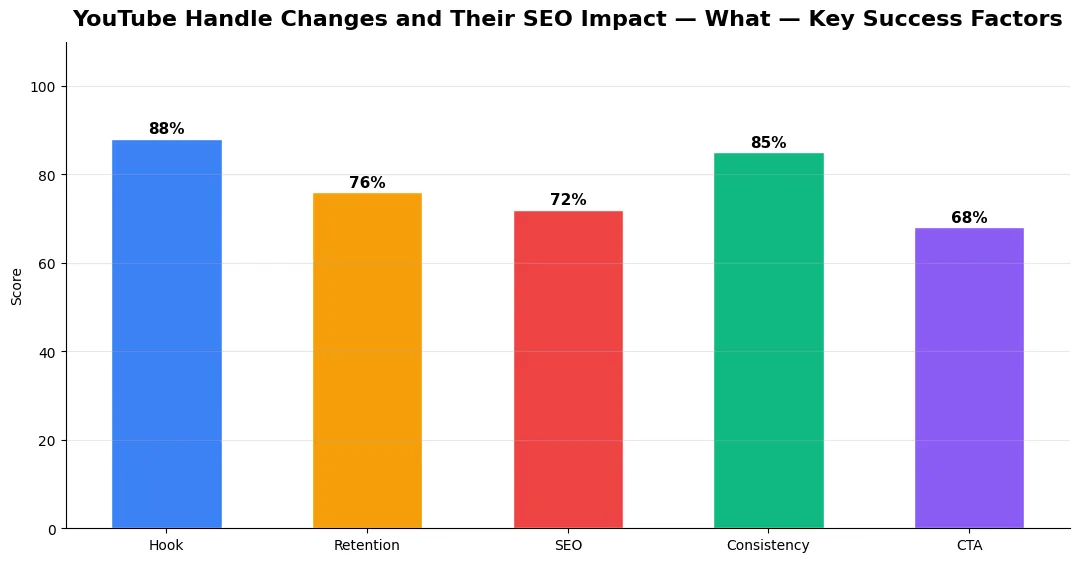
How YouTube handles work today
A handle is your channel’s short, unique identifier on YouTube. It appears in your channel URL, when someone tags you, and in several discovery surfaces. Your channel name is the display title viewers see on your page and in recommendations; it can differ from your handle. A legacy custom URL, if you still have one, may redirect or coexist with the handle system depending on what YouTube has migrated for your account. You can update your handle in YouTube Studio within the limits YouTube sets (frequency caps and uniqueness rules apply). Always pick something you expect to keep, because repeated changes train your audience to distrust links and mentions they saved earlier. When in doubt, sleep on the choice and ask a friend to spell it back to you after hearing it once.
YouTube handle changes and search visibility
There is no public “handle rank” formula. A handle change mainly risks broken habits: old bookmarks, bios, and articles may still use the old path until you fix them. Strong watch time and titles matter more than the exact @ string, but a rebrand without updating on-page SEO and branding can briefly weaken branded searches.
Best practices for choosing a handle
Pick a handle that matches your brand, is easy to say aloud, and stays consistent across platforms. Search for similar names before you lock it in. After a change, refresh your site, bio links, and sponsor decks, and tell fans in a Short or post. Tie the work to our YouTube monetization guide for 2026 so your funnel stays coherent.
Handles vs channel names vs custom URLs
| Element | Primary role | Typical viewer impact |
|---|---|---|
| Handle (@name) | Unique ID in URLs and mentions | How people tag you and share your link |
| Channel name | Display title on YouTube | Recognition in browse and search results |
| Custom URL (legacy) | Older vanity link format | May redirect; confirm in Studio |
| Video titles & SEO | Discovery on YouTube and Google | Larger effect on traffic than handle tweaks |
The table clarifies roles, not a reason to obsess over handle spelling. Most growth still comes from clear positioning, repeatable formats, and search-friendly packaging that matches viewer intent.
Conclusion: Treat your handle as stable infrastructure, refresh links after any change, and keep branding consistent across the web. Strong videos, thumbnails, and SEO matter more than the exact @ string, so align Studio settings with a steady optimization habit. A calm, one-time migration beats bouncing between names and confusing both viewers and search signals.
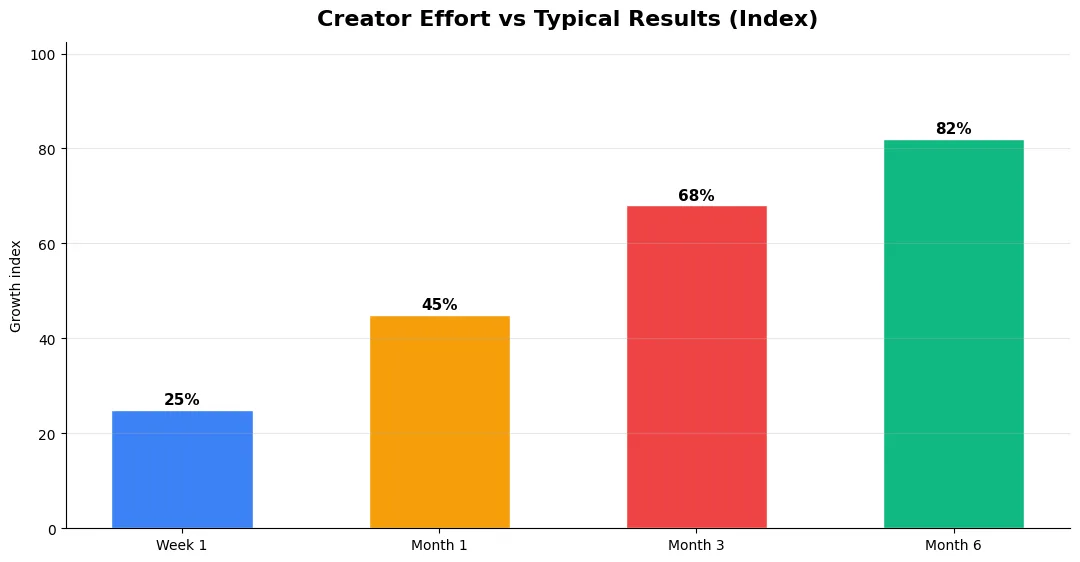
Common Mistakes to Avoid in 2026
The fastest way to stall growth is copying trends without adapting them to your niche voice. Another frequent error is optimizing only for views while ignoring audience fit, which inflates vanity metrics but hurts monetization and brand deals later. Avoid posting on inconsistent schedules; algorithms and audiences both reward predictable cadence.
Do not neglect analytics review. Spend thirty minutes weekly on retention curves, traffic sources, and click-through rate on thumbnails. Small iterative fixes—tighter hooks, clearer titles, better pacing—often outperform chasing entirely new formats every week.
Step-by-Step Workflow for 2026
Start by defining one clear outcome for every piece of content you publish. Map the viewer journey from the first frame to the subscribe or click action, and remove any step that does not move that journey forward. Batch your research, scripting, and B-roll capture so you are not context-switching between creative and administrative tasks every day.
Use a simple checklist before upload: title clarity, thumbnail readability on mobile, hook strength in the first three seconds, captions accuracy, and end-screen placement. Creators who treat upload as a quality gate—not a rush job—see compounding gains in retention and discovery over 2026.
Measuring Success — Metrics That Matter
Track average view duration and audience retention before raw view count. Rising retention tells you the content matches the promise of your title and thumbnail; falling retention signals a hook or pacing problem. Monitor click-through rate separately—high CTR with low retention usually means the packaging oversold the video.
For growth channels, watch subscriber conversion per thousand views and returning viewer percentage. For monetized channels, revenue per mille and watch time from high-value geographies matter more than viral spikes from low-monetization regions. Set monthly targets for two metrics only; too many KPIs dilute focus.
Advanced Tips for Competitive Niches
In saturated niches, specificity wins. Narrow your positioning until you can describe your ideal viewer in one sentence, then speak directly to that person in every title and hook. Collaborate with adjacent creators whose audiences overlap but are not identical—this expands reach without diluting brand identity.
Repurpose top performers into Shorts, community posts, and newsletter snippets to extract more value from proven ideas. Update evergreen videos when platforms change features; refreshed metadata and a pinned comment with the latest link can revive older assets.
| Level | Strategy | Typical outcome |
|---|---|---|
| Beginner approach | Copy trends blindly | Low retention, no brand |
| Structured approach | Test hooks + analyze data | Steady growth |
| Pro approach | Series + community loop | Higher LTV audience |
Does changing my YouTube handle hurt SEO?
Is a YouTube handle the same as a channel name?
How often can I change my YouTube handle?
Should my handle match my brand everywhere?
Final Verdict — Youtube Handle Changes And Their in 2026
Success with youtube handle changes and their comes from clarity, consistency, and honest delivery on every title and thumbnail promise. Use the step-by-step workflow, avoid the common mistakes above, and measure retention before chasing viral spikes. Small weekly improvements compound into channel growth that lasts beyond a single trending moment.
Also Read:


