The creators who grow fastest on YouTube are rarely the most talented — they are the most consistent. A content calendar transforms your channel from a reactive hobby into a strategic operation. Without a plan, you end up scrambling for ideas, missing upload days, and burning out. With a structured calendar, you always know what you are filming next, your audience knows when to expect new content, and the algorithm rewards your reliability. Here is how to build a content calendar that keeps you consistent in 2026 without sacrificing quality or your sanity.
This guide covers how to build a content in plain language for creators in India, the US, the UK, and global audiences. Whether you are starting out or refining a channel that already earns views, the frameworks below help you work smarter—not just post more often. Read through the charts and comparison table, then apply one change per week so improvements stick.
Why Consistency Matters More Than Frequency
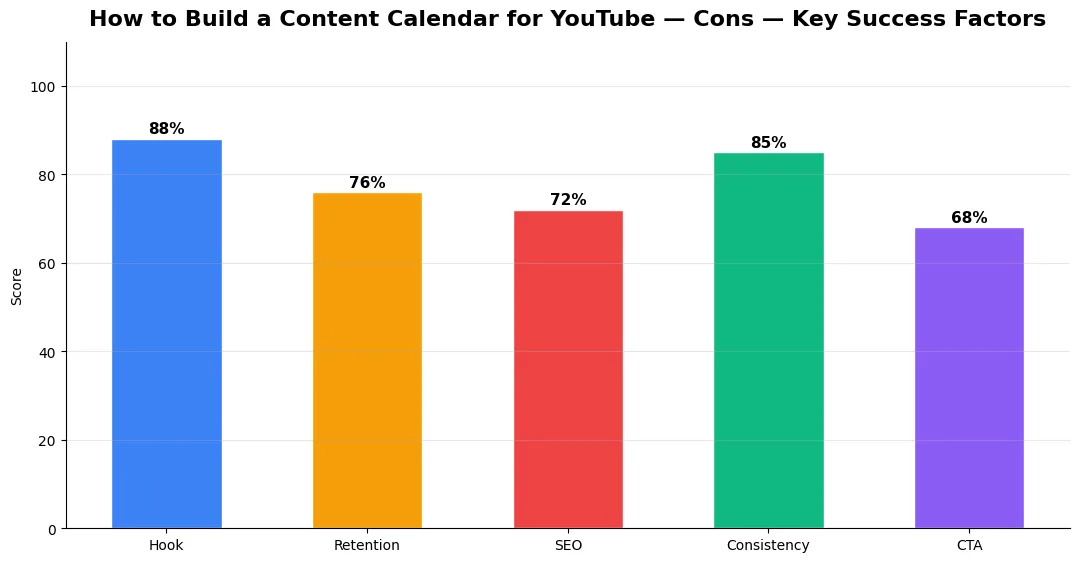
A common misconception is that uploading daily guarantees growth. In reality, the YouTube algorithm in 2026 favors consistent upload patterns over raw volume. A channel that uploads every Tuesday and Friday trains both its audience and the algorithm to expect content on those days. This predictability increases the chance your video appears in subscribers’ Home feeds at the right time. Uploading five videos one week and then going silent for a month confuses the system and reduces your channel’s baseline reach.
Choose a frequency you can sustain for at least six months. One quality video per week beats three rushed videos that underperform. Your calendar should reflect your actual production capacity — filming time, editing time, thumbnail creation, and rest days included.
Calendar Tools and Planning Methods for Creators
The right tool depends on your workflow complexity and team size. Here is a comparison of popular planning methods for YouTube creators.
| Tool / Method | Best For | Cost | Key Feature |
|---|---|---|---|
| Google Sheets | Solo creators wanting simplicity | Free | Fully customizable, easy to share |
| Notion | Creators who manage multiple content types | Free / Paid | Database views, templates, Kanban boards |
| Trello | Visual planners and small teams | Free / Paid | Drag-and-drop cards, checklists, due dates |
| Asana | Teams with complex production workflows | Free / Paid | Timeline view, task dependencies, automations |
| Google Calendar | Creators who want deadline reminders | Free | Time-blocked scheduling, mobile alerts |
| Paper Planner | Creators who prefer offline planning | Low | Tactile planning, zero screen fatigue |
Structuring Your Calendar for Niche Balance
A strong content calendar balances three types of videos: search-driven content, trending topics, and community-building uploads. Search-driven videos target keywords your audience is actively looking for — these are your long-term traffic workhorses. Trending topics capitalize on timely events or viral moments in your niche for short-term spikes. Community-building content like Q&A sessions, behind-the-scenes vlogs, or collaboration videos strengthens subscriber loyalty even if they do not generate massive view counts.
Map out a monthly ratio. For most niches, a mix of 50 percent search-driven, 30 percent trending, and 20 percent community content works well. Plot these across your upload days so you never publish three trending videos in a row with no evergreen content, or vice versa. If you create different content formats, assign specific formats to specific days — for example, tutorials on Tuesdays and Shorts on Fridays.
Batching and Scheduling for Sustainable Output
Content batching is the secret weapon behind every consistent creator. Instead of filming, editing, and uploading one video at a time, batch similar tasks together. Dedicate one or two days per month to filming multiple videos back-to-back. Spend another day editing all of them. This reduces context-switching overhead and ensures you always have a buffer of ready-to-publish content, protecting your schedule against illness, travel, or creative blocks.
Use the creator toolkit for upload workflows to streamline your scheduling and publishing process. YouTube’s built-in scheduling feature lets you set exact publish times days or weeks in advance. Pair this with your calendar tool to visualize your entire pipeline from idea to published video. Creators who automate repetitive parts of their workflow free up even more time for the creative work that actually grows their channel.
Measuring Success — Metrics That Matter
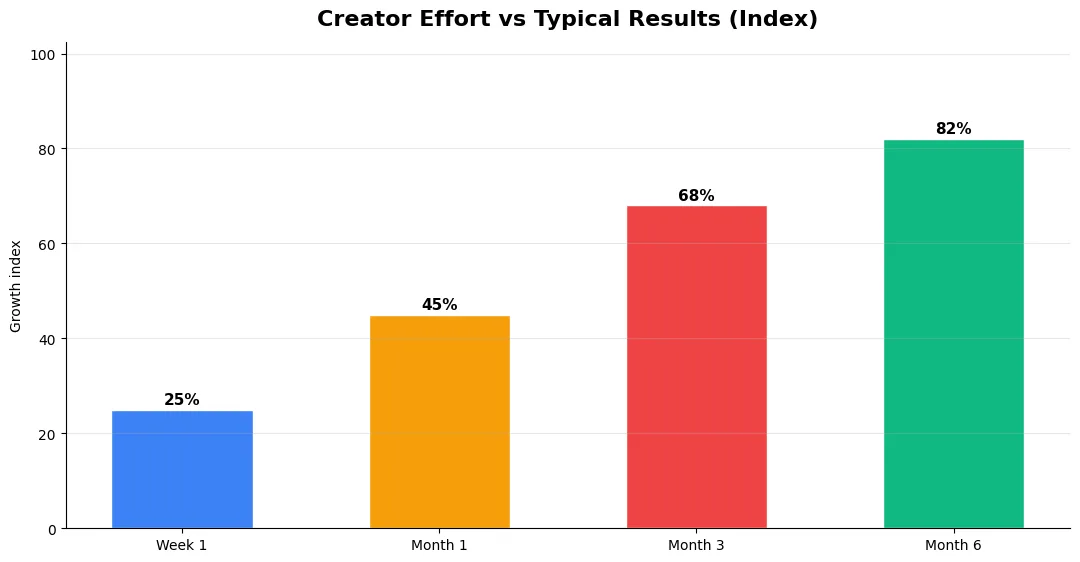
Track average view duration and audience retention before raw view count. Rising retention tells you the content matches the promise of your title and thumbnail; falling retention signals a hook or pacing problem. Monitor click-through rate separately—high CTR with low retention usually means the packaging oversold the video.
For growth channels, watch subscriber conversion per thousand views and returning viewer percentage. For monetized channels, revenue per mille and watch time from high-value geographies matter more than viral spikes from low-monetization regions. Set monthly targets for two metrics only; too many KPIs dilute focus.
Tools and Resources That Save Time
Invest in lightweight tools that reduce friction: a caption workflow, a thumbnail template system, and a title/description helper so metadata stays consistent. The YT Title Description Generator app helps you draft SEO-friendly titles and descriptions quickly when you batch-upload multiple videos.
Keep a swipe file of hooks, titles, and thumbnails that performed well in your niche—not to copy, but to analyze patterns. Pair that with YouTube Studio analytics and one external keyword or trend tool so creative decisions stay grounded in data.
Advanced Tips for Competitive Niches
In saturated niches, specificity wins. Narrow your positioning until you can describe your ideal viewer in one sentence, then speak directly to that person in every title and hook. Collaborate with adjacent creators whose audiences overlap but are not identical—this expands reach without diluting brand identity.
Repurpose top performers into Shorts, community posts, and newsletter snippets to extract more value from proven ideas. Update evergreen videos when platforms change features; refreshed metadata and a pinned comment with the latest link can revive older assets.
Step-by-Step Workflow for 2026
Start by defining one clear outcome for every piece of content you publish. Map the viewer journey from the first frame to the subscribe or click action, and remove any step that does not move that journey forward. Batch your research, scripting, and B-roll capture so you are not context-switching between creative and administrative tasks every day.
Use a simple checklist before upload: title clarity, thumbnail readability on mobile, hook strength in the first three seconds, captions accuracy, and end-screen placement. Creators who treat upload as a quality gate—not a rush job—see compounding gains in retention and discovery over 2026.
| Level | Strategy | Typical outcome |
|---|---|---|
| Beginner approach | Copy trends blindly | Low retention, no brand |
| Structured approach | Test hooks + analyze data | Steady growth |
| Pro approach | Series + community loop | Higher LTV audience |
How far in advance should I plan my YouTube content calendar?
What is the best upload frequency for YouTube growth?
How do I avoid burnout while staying consistent on YouTube?
Should I include YouTube Shorts in my content calendar?
What is content batching for YouTube?
Final Verdict — How To Build A Content in 2026
Success with how to build a content comes from clarity, consistency, and honest delivery on every title and thumbnail promise. Use the step-by-step workflow, avoid the common mistakes above, and measure retention before chasing viral spikes. Small weekly improvements compound into channel growth that lasts beyond a single trending moment.
Also Read:


