If you already explain ideas on camera, you can turn that expertise into income beyond ads. Digital products—courses, templates, and ebooks—let viewers pay once for something they can use immediately. This guide walks through what to sell, where to host it, how to price it, and how to promote it naturally on your channel, with context from our broader YouTube monetization guide for creators in 2026 and ways to earn beyond ad revenue on YouTube.
This guide covers how to create and sell in plain language for creators in India, the US, the UK, and global audiences. Whether you are starting out or refining a channel that already earns views, the frameworks below help you work smarter—not just post more often. Read through the charts and comparison table, then apply one change per week so improvements stick.
Types of digital products that fit YouTube audiences
Courses work when you teach a skill step by step—editing, scripting, or a hobby niche. Templates (Notion planners, spreadsheet trackers, thumbnail PSDs) sell because they save time. Ebooks and guides suit deep topics you can summarize in a downloadable PDF. Pick one format that matches how you already help people in your videos, then expand later.
Where to sell: Gumroad, Teachable, or your own site
Gumroad is strong for one-off downloads and simple checkout with minimal setup. Teachable (and similar course platforms) fits structured curricula, modules, and student accounts. Your own WordPress or Shopify site gives maximum control and branding but needs more maintenance. Many creators start on a marketplace-style platform, then add a owned site once sales are steady. For how rates vary by topic, see our YouTube CPM rates by niche comparison for 2026.
| Option | Best for | Trade-off |
|---|---|---|
| Gumroad | Templates, ebooks, small courses | Simple; less built-in “school” features |
| Teachable | Multi-lesson courses, cohorts | Monthly fees or revenue share on some plans |
| Own site | Brand, bundles, email list | You handle hosting, payments, and updates |
Pricing and promoting digital products on YouTube
Price against outcomes, not length: a template that saves five hours a week can command more than a long ebook nobody finishes. Offer a clear refund window to reduce purchase anxiety. On YouTube, mention your product when it solves the exact problem in the video—pin a comment, link in the description, and use a short end screen. Avoid hard selling every upload; alternate value-first videos with occasional dedicated launches.
Creating and selling digital products is one of the most scalable ways to monetize a channel when ads alone fluctuate. Choose a product type that matches your teaching style, pick a platform you can maintain today, and align price with the result you deliver. Stay consistent with mentions and improve your offer from feedback.
Step-by-Step Workflow for 2026
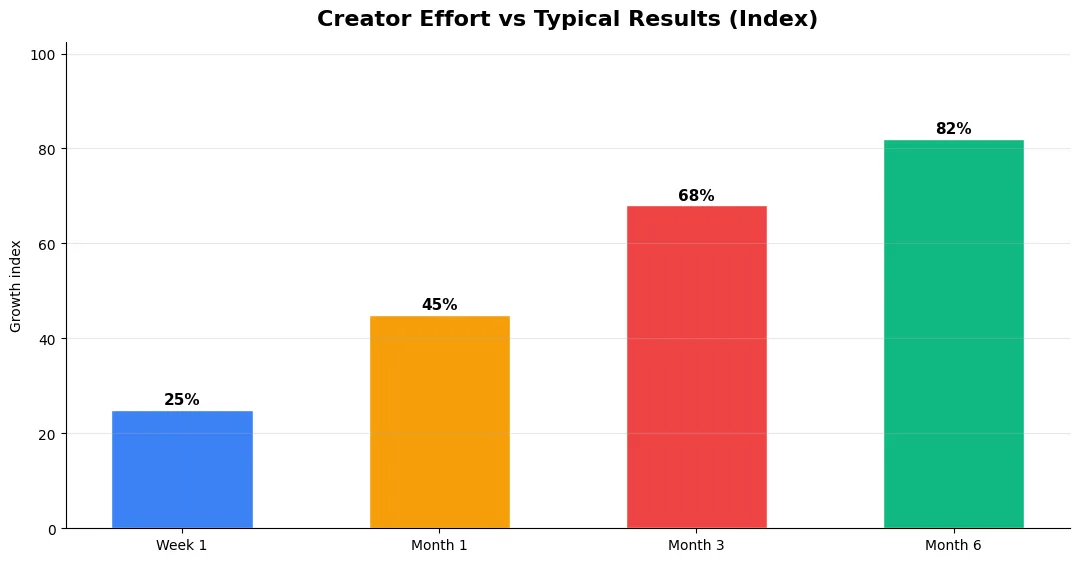
Start by defining one clear outcome for every piece of content you publish. Map the viewer journey from the first frame to the subscribe or click action, and remove any step that does not move that journey forward. Batch your research, scripting, and B-roll capture so you are not context-switching between creative and administrative tasks every day.
Use a simple checklist before upload: title clarity, thumbnail readability on mobile, hook strength in the first three seconds, captions accuracy, and end-screen placement. Creators who treat upload as a quality gate—not a rush job—see compounding gains in retention and discovery over 2026.
Common Mistakes to Avoid in 2026
The fastest way to stall growth is copying trends without adapting them to your niche voice. Another frequent error is optimizing only for views while ignoring audience fit, which inflates vanity metrics but hurts monetization and brand deals later. Avoid posting on inconsistent schedules; algorithms and audiences both reward predictable cadence.
Do not neglect analytics review. Spend thirty minutes weekly on retention curves, traffic sources, and click-through rate on thumbnails. Small iterative fixes—tighter hooks, clearer titles, better pacing—often outperform chasing entirely new formats every week.
Tools and Resources That Save Time
Invest in lightweight tools that reduce friction: a caption workflow, a thumbnail template system, and a title/description helper so metadata stays consistent. The YT Title Description Generator app helps you draft SEO-friendly titles and descriptions quickly when you batch-upload multiple videos.
Keep a swipe file of hooks, titles, and thumbnails that performed well in your niche—not to copy, but to analyze patterns. Pair that with YouTube Studio analytics and one external keyword or trend tool so creative decisions stay grounded in data.
Measuring Success — Metrics That Matter
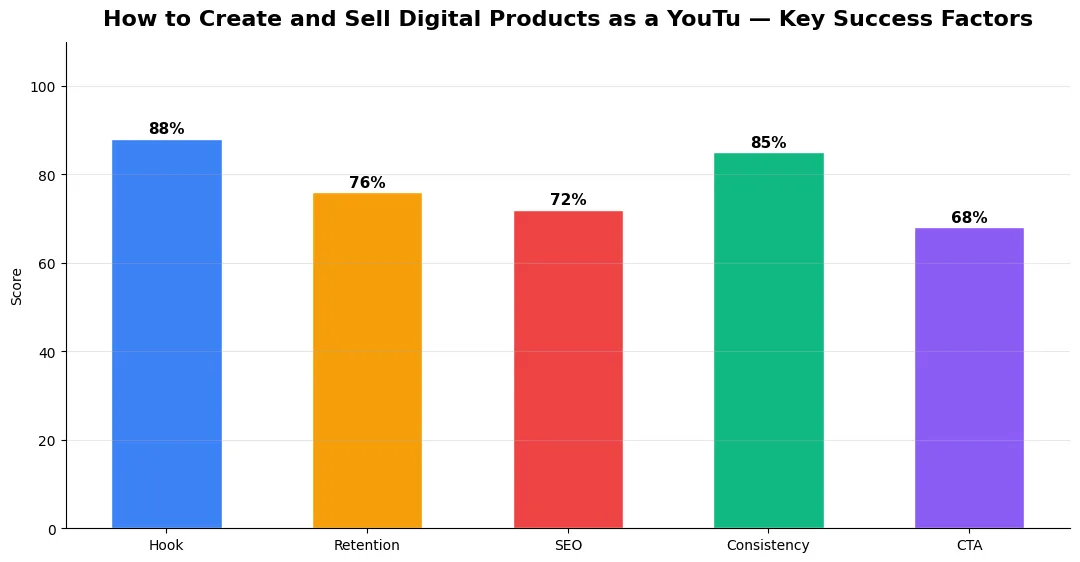
Track average view duration and audience retention before raw view count. Rising retention tells you the content matches the promise of your title and thumbnail; falling retention signals a hook or pacing problem. Monitor click-through rate separately—high CTR with low retention usually means the packaging oversold the video.
For growth channels, watch subscriber conversion per thousand views and returning viewer percentage. For monetized channels, revenue per mille and watch time from high-value geographies matter more than viral spikes from low-monetization regions. Set monthly targets for two metrics only; too many KPIs dilute focus.
| Level | Strategy | Typical outcome |
|---|---|---|
| Beginner approach | Copy trends blindly | Low retention, no brand |
| Structured approach | Test hooks + analyze data | Steady growth |
| Pro approach | Series + community loop | Higher LTV audience |
What is the easiest digital product to sell as a new YouTube creator?
A simple template or short checklist tied to your niche is usually easiest: it is quick to make, easy to deliver, and matches how viewers already use your advice.
Is Gumroad or Teachable better for YouTube creators?
Gumroad suits downloads and lightweight courses; Teachable fits longer curricula and student progress. Pick based on whether you are selling files or a full learning experience.
How often should I mention my digital product in videos?
Mention it when it directly helps the topic, and use description links and pinned comments on most videos. Dedicated launch or update videos a few times per quarter keep promotion visible without feeling spammy.
Do I need a large audience to sell digital products?
No—a focused, trusting small audience often converts better than a broad one. Clear positioning and proof (demos, testimonials) matter more than raw subscriber count.
Final Verdict — How To Create And Sell in 2026
Success with how to create and sell comes from clarity, consistency, and honest delivery on every title and thumbnail promise. Use the step-by-step workflow, avoid the common mistakes above, and measure retention before chasing viral spikes. Small weekly improvements compound into channel growth that lasts beyond a single trending moment.
Also Read:


