YouTube Studio gives you basic channel analytics, but serious creators need deeper insights to grow faster. Third-party analytics tools like VidIQ, TubeBuddy, Social Blade, and Noxinfluencer offer advanced data on competitors, keyword trends, and audience behavior. In this guide, we compare the best analytics tools beyond YouTube Studio for creators in 2026 — covering free and paid features so you can pick the right one for your channel.
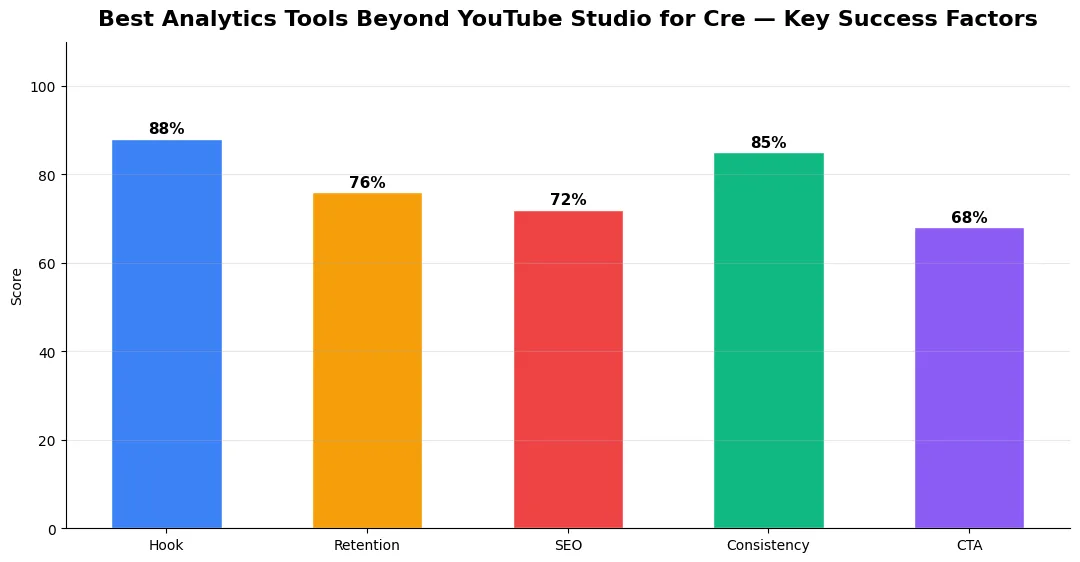
This guide covers best analytics tools beyond youtube in plain language for creators in India, the US, the UK, and global audiences. Whether you are starting out or refining a channel that already earns views, the frameworks below help you work smarter—not just post more often. Read through the charts and comparison table, then apply one change per week so improvements stick.
Why You Need Analytics Beyond YouTube Studio
YouTube Studio covers the basics — views, watch time, subscribers, and revenue. But it does not show you what your competitors are doing, which keywords are trending, or how your tags compare to top-ranking videos. Third-party tools fill these gaps. They help you find content opportunities, track channel growth over time, and optimize every upload for better reach. If you are serious about growing in 2026, relying only on YouTube Studio puts you at a disadvantage.
Top Analytics Tools for YouTube Creators
VidIQ is one of the most popular YouTube analytics extensions. It shows real-time stats on any video, including tags, keyword scores, and SEO suggestions. The free plan gives you basic keyword research and channel audits, while the paid plans unlock competitor tracking and trend alerts. VidIQ integrates directly into YouTube, making it easy to use while browsing.
TubeBuddy offers similar features with a focus on bulk processing and A/B testing. Its keyword explorer helps you find low-competition topics, and the tag sorter shows which tags drive the most traffic. TubeBuddy also has a mobile app so you can check stats on the go. The free tier is useful, but the Legend plan gives you advanced competitor analysis.
Social Blade tracks channel growth, subscriber counts, and estimated earnings for any public YouTube channel. It is completely free to use and great for benchmarking your growth against similar creators. Social Blade also covers other platforms like Instagram and TikTok, which is useful if you post across multiple channels.
Noxinfluencer is an underrated tool that provides detailed analytics on channel performance, audience demographics, and video rankings. It is especially strong for creators who work with brands, as it includes influencer marketing data and estimated channel value. The free version covers most features you need.
For a complete list of free AI-powered tools that complement these analytics platforms, check out our best free AI tools for YouTube creators guide.
Comparison Table: Free vs Paid Features
| Tool | Free Features | Paid Features | Best For |
|---|---|---|---|
| VidIQ | Basic keyword score, daily ideas, channel audit | Competitor tracking, trend alerts, keyword engine | SEO-focused creators |
| TubeBuddy | Tag explorer, basic A/B test, SEO studio | Bulk processing, advanced keyword planner, legend tools | Optimization and testing |
| Social Blade | Full channel stats, growth tracking, earnings estimate | Premium dashboard, custom reports | Competitor benchmarking |
| Noxinfluencer | Channel analytics, video ranking, audience data | Influencer marketing tools, brand collaboration data | Brand deals and sponsorships |
How to Choose the Right Tool
If your main goal is ranking higher in YouTube search, VidIQ or TubeBuddy are your best picks — pair them with a solid YouTube SEO strategy for maximum results. If you want to track competitor growth and benchmark your channel, Social Blade is the simplest option. For creators focused on brand deals and sponsorship data, Noxinfluencer provides the most relevant insights. Many creators use two or more tools together for a complete analytics setup.
Conclusion
YouTube Studio is a good starting point, but creators who want to grow faster in 2026 should add third-party analytics tools to their workflow. VidIQ, TubeBuddy, Social Blade, and Noxinfluencer each bring unique strengths. Start with the free tiers, test what works for your channel, and upgrade when you are ready to take your analytics to the next level.
👉 Best Free AI Tools for YouTube Titles, Descriptions & Tags
👉 YouTube Creator Toolkit: Script to Upload in 2026
Measuring Success — Metrics That Matter
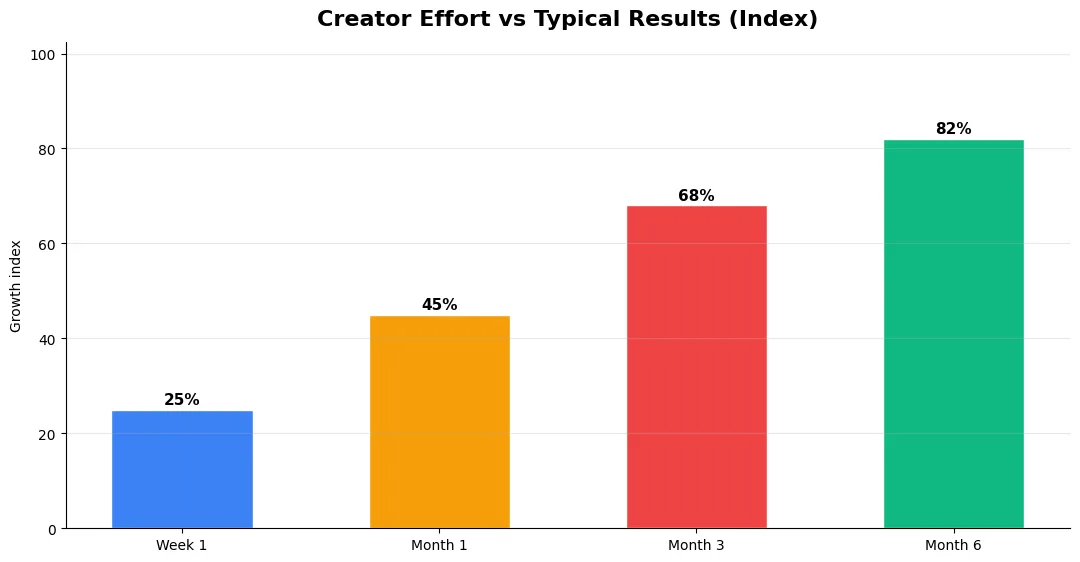
Track average view duration and audience retention before raw view count. Rising retention tells you the content matches the promise of your title and thumbnail; falling retention signals a hook or pacing problem. Monitor click-through rate separately—high CTR with low retention usually means the packaging oversold the video.
For growth channels, watch subscriber conversion per thousand views and returning viewer percentage. For monetized channels, revenue per mille and watch time from high-value geographies matter more than viral spikes from low-monetization regions. Set monthly targets for two metrics only; too many KPIs dilute focus.
Common Mistakes to Avoid in 2026
The fastest way to stall growth is copying trends without adapting them to your niche voice. Another frequent error is optimizing only for views while ignoring audience fit, which inflates vanity metrics but hurts monetization and brand deals later. Avoid posting on inconsistent schedules; algorithms and audiences both reward predictable cadence.
Do not neglect analytics review. Spend thirty minutes weekly on retention curves, traffic sources, and click-through rate on thumbnails. Small iterative fixes—tighter hooks, clearer titles, better pacing—often outperform chasing entirely new formats every week.
Tools and Resources That Save Time
Invest in lightweight tools that reduce friction: a caption workflow, a thumbnail template system, and a title/description helper so metadata stays consistent. The YT Title Description Generator app helps you draft SEO-friendly titles and descriptions quickly when you batch-upload multiple videos.
Keep a swipe file of hooks, titles, and thumbnails that performed well in your niche—not to copy, but to analyze patterns. Pair that with YouTube Studio analytics and one external keyword or trend tool so creative decisions stay grounded in data.
Advanced Tips for Competitive Niches
In saturated niches, specificity wins. Narrow your positioning until you can describe your ideal viewer in one sentence, then speak directly to that person in every title and hook. Collaborate with adjacent creators whose audiences overlap but are not identical—this expands reach without diluting brand identity.
Repurpose top performers into Shorts, community posts, and newsletter snippets to extract more value from proven ideas. Update evergreen videos when platforms change features; refreshed metadata and a pinned comment with the latest link can revive older assets.
| Level | Strategy | Typical outcome |
|---|---|---|
| Beginner approach | Copy trends blindly | Low retention, no brand |
| Structured approach | Test hooks + analyze data | Steady growth |
| Pro approach | Series + community loop | Higher LTV audience |
Is VidIQ better than TubeBuddy for YouTube analytics?
Can I use these analytics tools for free?
Do third-party analytics tools affect my YouTube channel negatively?
Final Verdict — Best Analytics Tools Beyond Youtube in 2026
Success with best analytics tools beyond youtube comes from clarity, consistency, and honest delivery on every title and thumbnail promise. Use the step-by-step workflow, avoid the common mistakes above, and measure retention before chasing viral spikes. Small weekly improvements compound into channel growth that lasts beyond a single trending moment.
Also Read:


