The right AI tools can cut your YouTube production time in half without sacrificing quality. From scriptwriting to editing, thumbnails to SEO optimization, there’s now a free or affordable AI tool for every step of the creator workflow. This is your complete guide to the best free AI tools for YouTube creators in 2026 — tested, compared, and ranked by real-world usefulness.
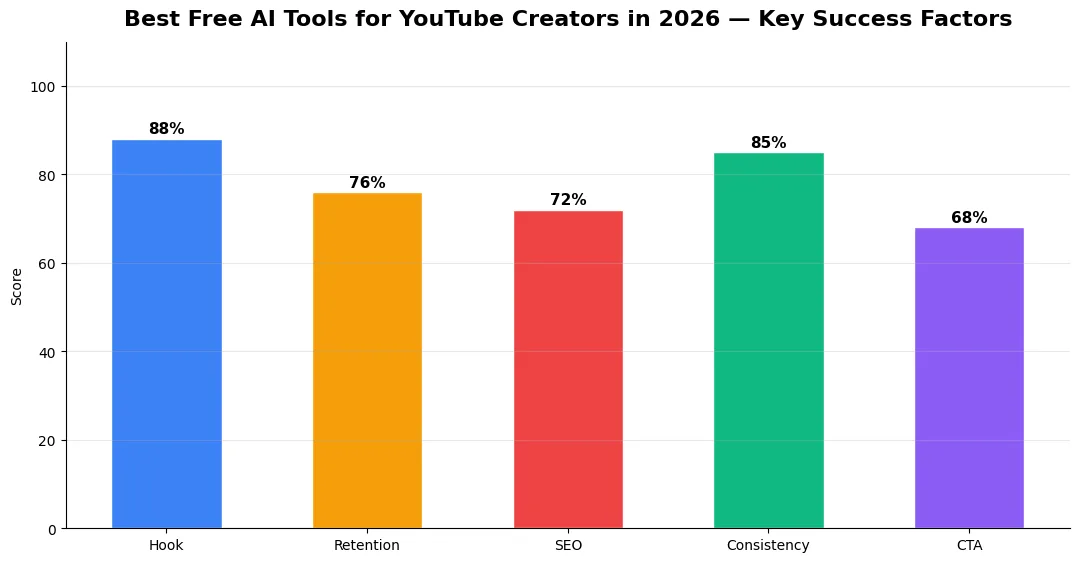
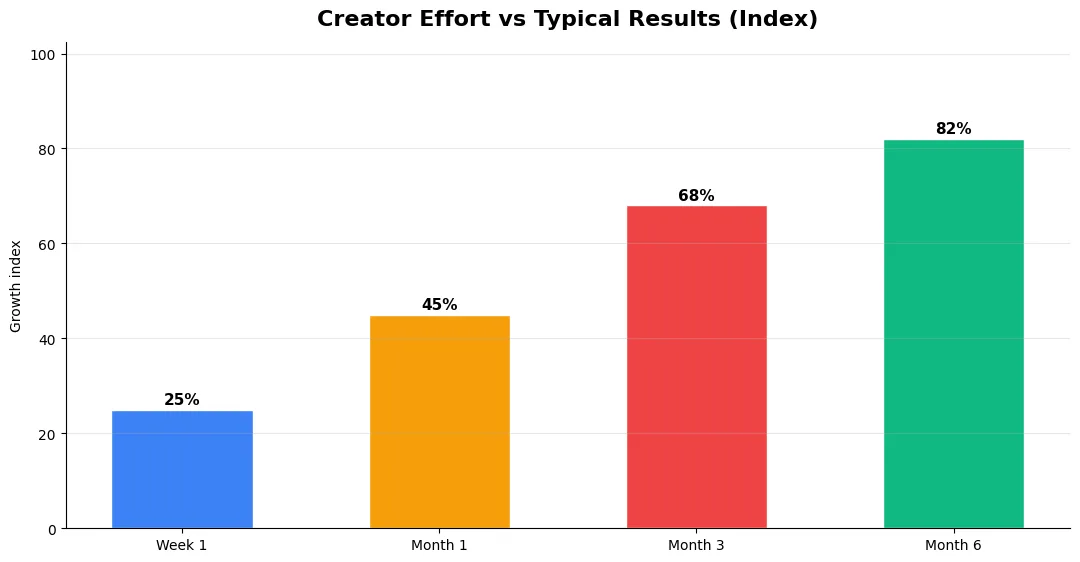
This guide covers best free ai tools for in plain language for creators in India, the US, the UK, and global audiences. Whether you are starting out or refining a channel that already earns views, the frameworks below help you work smarter—not just post more often. Read through the charts and comparison table, then apply one change per week so improvements stick.
Best AI Tools for YouTube Scriptwriting
ChatGPT (Free–$20/month): The most versatile option for generating video scripts, outlines, and content ideas. Works best when you provide specific prompts with your tone, audience, and video length. The free tier handles most script generation needs, while the paid version adds longer context windows for series planning.
Claude (Free–$20/month): Excels at longer, more nuanced scripts. Better than ChatGPT for in-depth analysis videos and educational content where accuracy matters. Its larger context window makes it ideal for planning multi-episode series. Both tools work best as draft generators — always rewrite in your own voice to avoid YouTube’s AI slop detection.
Best Free AI Tools for YouTube Titles, Descriptions, and Tags
Your video’s metadata determines whether anyone finds it. The YT Title Description Generator is a standout free Android app that generates SEO-optimized titles (80-95 characters), comprehensive descriptions (200-250 words), strategic hashtags, and relevant tags from a single topic input. It also includes a text-to-speech preview, revenue calculator, and an AI thumbnail generator in its latest update. No login or subscription needed.
TubeBuddy (Free–$4.99/month): Browser extension with keyword research, A/B title testing, and tag suggestions. The SEO Studio analyzes your metadata against competitors. vidIQ (Free–$7.50/month): Provides keyword scores, trend alerts, and AI-powered title generation in the pro tier. Best for in-depth competitor analysis and finding trending topic opportunities.
Best AI Video Editing Tools for YouTube Creators
CapCut (Free): The most popular free editor among YouTube creators. AI features include auto-captions, background removal, and style transfer. The desktop version is powerful enough for professional long-form editing. Descript (Free–$24/month): Revolutionary text-based editing — edit your video by editing the transcript. AI removes filler words, generates highlights, and creates audiograms. DaVinci Resolve (Free): Professional-grade editing with AI-powered color correction, audio enhancement, and motion tracking. The free version is genuinely professional — many full-time creators use nothing else.
Best AI Tools for YouTube Thumbnails
Canva AI (Free–$13/month): The easiest thumbnail creator with AI background removal, magic eraser, and text effects. Thousands of YouTube-specific templates. Midjourney ($10/month): Generates unique custom illustrations and product renders for thumbnails. Adobe Firefly (Free tier): Generative fill and AI image expansion help create eye-catching compositions from limited source material.
Best AI Voiceover and Audio Tools
ElevenLabs ($5–$22/month): The gold standard for AI voiceover with natural-sounding voices and custom voice cloning. Essential for faceless channel creators. Adobe Podcast (Free): AI audio enhancement that turns any mic into studio-quality sound. Removes background noise, echoes, and mic pops. Suno AI (Free tier): Generates original music and background tracks from text descriptions. No copyright worries — you own the output.
Complete AI Creator Toolkit Comparison
| Category | Best Free Option | Best Paid Option | Key Feature |
|---|---|---|---|
| Scriptwriting | ChatGPT Free | Claude Pro | Draft generation + outlining |
| Titles & Descriptions | YT Title Desc Generator | vidIQ Pro | SEO-optimized metadata |
| Video Editing | DaVinci Resolve / CapCut | Descript | Text-based editing |
| Thumbnails | Canva Free | Midjourney | Custom AI illustrations |
| Voiceover | Adobe Podcast | ElevenLabs | Voice cloning |
| Music | Suno AI Free | Suno Pro | Original music from text |
| Analytics | YouTube Studio | TubeBuddy | Keyword + competitor research |
| Captions | CapCut Auto-Captions | Descript | AI transcription + styling |
How to Build Your AI Creator Workflow
The best approach is stacking free tools into a complete pipeline. Start with ChatGPT for script drafts, use the YT Title Description Generator for metadata, edit with CapCut or DaVinci Resolve, enhance audio with Adobe Podcast, create thumbnails in Canva, and generate music with Suno AI. This entire stack costs ₹0 and covers every production step. Add TubeBuddy or vidIQ free tiers for keyword research. The total cost of a professional AI-powered YouTube production toolkit in 2026 can be literally zero.
Final Verdict
AI tools have democratized YouTube content creation. The gap between a solo creator with free AI tools and a team with expensive software has never been smaller. Start with the free tiers of everything listed above, upgrade only when a specific tool becomes a bottleneck, and always remember: AI accelerates your workflow, but your unique perspective and voice are what build an audience.
Tools and Resources That Save Time
Invest in lightweight tools that reduce friction: a caption workflow, a thumbnail template system, and a title/description helper so metadata stays consistent. The YT Title Description Generator app helps you draft SEO-friendly titles and descriptions quickly when you batch-upload multiple videos.
Keep a swipe file of hooks, titles, and thumbnails that performed well in your niche—not to copy, but to analyze patterns. Pair that with YouTube Studio analytics and one external keyword or trend tool so creative decisions stay grounded in data.
Common Mistakes to Avoid in 2026
The fastest way to stall growth is copying trends without adapting them to your niche voice. Another frequent error is optimizing only for views while ignoring audience fit, which inflates vanity metrics but hurts monetization and brand deals later. Avoid posting on inconsistent schedules; algorithms and audiences both reward predictable cadence.
Do not neglect analytics review. Spend thirty minutes weekly on retention curves, traffic sources, and click-through rate on thumbnails. Small iterative fixes—tighter hooks, clearer titles, better pacing—often outperform chasing entirely new formats every week.
Measuring Success — Metrics That Matter
Track average view duration and audience retention before raw view count. Rising retention tells you the content matches the promise of your title and thumbnail; falling retention signals a hook or pacing problem. Monitor click-through rate separately—high CTR with low retention usually means the packaging oversold the video.
For growth channels, watch subscriber conversion per thousand views and returning viewer percentage. For monetized channels, revenue per mille and watch time from high-value geographies matter more than viral spikes from low-monetization regions. Set monthly targets for two metrics only; too many KPIs dilute focus.
Advanced Tips for Competitive Niches
In saturated niches, specificity wins. Narrow your positioning until you can describe your ideal viewer in one sentence, then speak directly to that person in every title and hook. Collaborate with adjacent creators whose audiences overlap but are not identical—this expands reach without diluting brand identity.
Repurpose top performers into Shorts, community posts, and newsletter snippets to extract more value from proven ideas. Update evergreen videos when platforms change features; refreshed metadata and a pinned comment with the latest link can revive older assets.
| Level | Strategy | Typical outcome |
|---|---|---|
| Beginner approach | Copy trends blindly | Low retention, no brand |
| Structured approach | Test hooks + analyze data | Steady growth |
| Pro approach | Series + community loop | Higher LTV audience |
What are the best free AI tools for YouTube creators in 2026?
Is the YT Title Description Generator app really free?
Which AI video editor is best for YouTube creators?
Can you build a YouTube channel using only free AI tools?
Will using AI tools get my YouTube channel penalized?
Final Verdict — Best Free Ai Tools For in 2026
Success with best free ai tools for comes from clarity, consistency, and honest delivery on every title and thumbnail promise. Use the step-by-step workflow, avoid the common mistakes above, and measure retention before chasing viral spikes. Small weekly improvements compound into channel growth that lasts beyond a single trending moment.
Also Read:


