The YouTube Shopping affiliate program lets eligible creators earn commissions when viewers buy tagged products through YouTube’s shopping surfaces. If you already monetize with content and commerce, it complements our YouTube Shopping in-app checkout guide for creators. Below is a practical deep-dive on how the program works, typical commission bands by category, tagging, checkout flow, and how it compares to Amazon Associates.
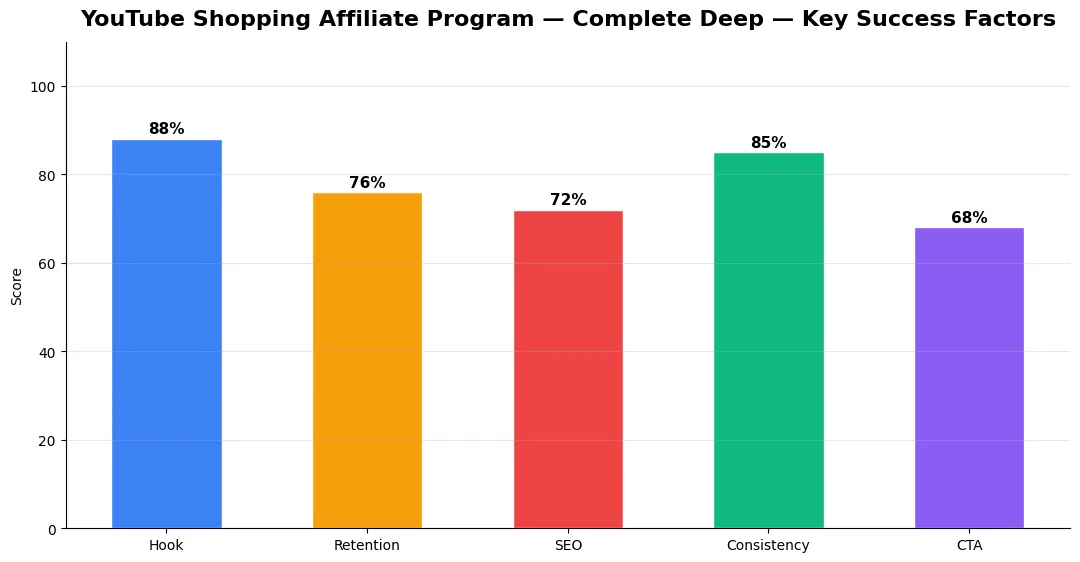
This guide covers youtube shopping affiliate program complete in plain language for creators in India, the US, the UK, and global audiences. Whether you are starting out or refining a channel that already earns views, the frameworks below help you work smarter—not just post more often. Read through the charts and comparison table, then apply one change per week so improvements stick.
How the YouTube Shopping affiliate program works
Creators in supported regions connect to participating retailers or affiliate networks approved by YouTube. You add products to the Shopping tab, live stream product shelf, or video product features. When a viewer purchases through the eligible link or in-app flow, the retailer attributes the sale and pays a commission according to that retailer’s program rules. YouTube surfaces the shopping UI; commission rates and policies ultimately come from the merchant or network, not from YouTube alone.
Eligibility usually requires adherence to YouTube monetization policies, Shopping feature access, and linked merchant accounts. Always confirm your status in YouTube Studio and read the latest partner terms, as programs evolve.
Commission rates by category (typical ranges)
Commissions vary by retailer and product category. Fashion and beauty often land in mid single digits to low teens as a percentage of order value; electronics may be lower; digital goods or niche specialty items sometimes pay higher. These are illustrative ranges—your agreement screen in the affiliate tool is the source of truth. Stack affiliate earnings next to ad revenue using ideas from earning beyond ad revenue on YouTube.
How to tag products and the in-app checkout flow
In Studio or the mobile flow, select products from your linked catalog and attach them to videos, Shorts where supported, or live streams. Clear on-camera callouts (“tap the bag icon”) improve taps. When in-app checkout is available for a given product and region, viewers can complete purchase without leaving YouTube, which can lift conversion compared with sending everyone to an external tab. For step-by-step context, keep our in-app checkout creator guide bookmarked.
YouTube Shopping affiliates vs Amazon Associates
Amazon Associates is familiar and broad, but links often pull users off YouTube and cookie windows differ by locale. YouTube Shopping keeps commerce inside the watch experience when checkout is supported, which can help impulse buys on review or haul content. Amazon may win on sheer catalog depth; YouTube Shopping can win on native placement and live selling. Many creators use both with clear disclosure and consistent tracking.
| Aspect | YouTube Shopping affiliate | Amazon Associates |
|---|---|---|
| Where purchase happens | Often in-app or via integrated merchant flow on YouTube | Usually on Amazon’s site or app |
| Best content fit | Live demos, Shorts hauls, integrated product shelves | Roundups, “links below” descriptions, global catalog |
| Commission clarity | Set per linked retailer or network in YouTube tools | Published category rates on Amazon’s program pages |
| Creator effort | Tagging, catalog hygiene, disclosure on video | Link building, disclosure, occasional API or tool use |
Conclusion: The YouTube Shopping affiliate program rewards creators who treat product data and tagging as seriously as thumbnails. Pair it with honest reviews, strong disclosure, and regular catalog checks so out-of-stock items do not frustrate viewers. Tie results back to the wider monetization mix in our YouTube monetization guide (2026).
Measuring Success — Metrics That Matter
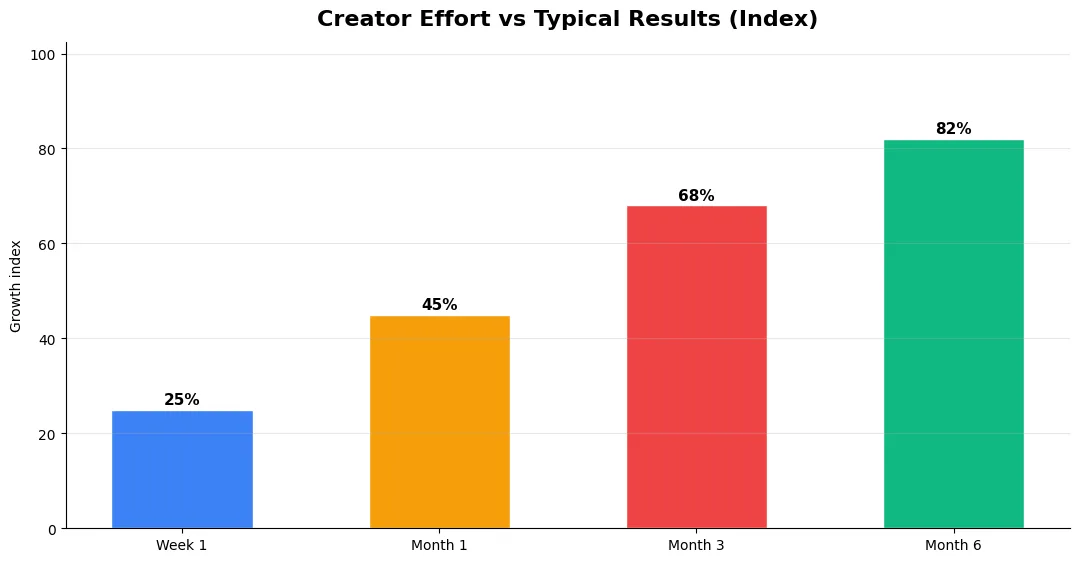
Track average view duration and audience retention before raw view count. Rising retention tells you the content matches the promise of your title and thumbnail; falling retention signals a hook or pacing problem. Monitor click-through rate separately—high CTR with low retention usually means the packaging oversold the video.
For growth channels, watch subscriber conversion per thousand views and returning viewer percentage. For monetized channels, revenue per mille and watch time from high-value geographies matter more than viral spikes from low-monetization regions. Set monthly targets for two metrics only; too many KPIs dilute focus.
Tools and Resources That Save Time
Invest in lightweight tools that reduce friction: a caption workflow, a thumbnail template system, and a title/description helper so metadata stays consistent. The YT Title Description Generator app helps you draft SEO-friendly titles and descriptions quickly when you batch-upload multiple videos.
Keep a swipe file of hooks, titles, and thumbnails that performed well in your niche—not to copy, but to analyze patterns. Pair that with YouTube Studio analytics and one external keyword or trend tool so creative decisions stay grounded in data.
Step-by-Step Workflow for 2026
Start by defining one clear outcome for every piece of content you publish. Map the viewer journey from the first frame to the subscribe or click action, and remove any step that does not move that journey forward. Batch your research, scripting, and B-roll capture so you are not context-switching between creative and administrative tasks every day.
Use a simple checklist before upload: title clarity, thumbnail readability on mobile, hook strength in the first three seconds, captions accuracy, and end-screen placement. Creators who treat upload as a quality gate—not a rush job—see compounding gains in retention and discovery over 2026.
Advanced Tips for Competitive Niches
In saturated niches, specificity wins. Narrow your positioning until you can describe your ideal viewer in one sentence, then speak directly to that person in every title and hook. Collaborate with adjacent creators whose audiences overlap but are not identical—this expands reach without diluting brand identity.
Repurpose top performers into Shorts, community posts, and newsletter snippets to extract more value from proven ideas. Update evergreen videos when platforms change features; refreshed metadata and a pinned comment with the latest link can revive older assets.
| Level | Strategy | Typical outcome |
|---|---|---|
| Beginner approach | Copy trends blindly | Low retention, no brand |
| Structured approach | Test hooks + analyze data | Steady growth |
| Pro approach | Series + community loop | Higher LTV audience |
Who can join the YouTube Shopping affiliate program?
How do I see my commission rate for YouTube Shopping affiliates?
Do I need to disclose affiliate links on YouTube?
Is YouTube Shopping affiliate income the same as ad revenue?
Final Verdict — Youtube Shopping Affiliate Program Complete in 2026
Success with youtube shopping affiliate program complete comes from clarity, consistency, and honest delivery on every title and thumbnail promise. Use the step-by-step workflow, avoid the common mistakes above, and measure retention before chasing viral spikes. Small weekly improvements compound into channel growth that lasts beyond a single trending moment.
Also Read:


