ChatGPT has changed the way YouTube creators plan and write video scripts. Whether you run a tech review channel or a vlog, AI-powered scripting helps you outline ideas faster, write stronger hooks, and maintain a consistent upload schedule. In this complete creator guide, we walk through the best prompts, script structures, and practical tips to make ChatGPT your most reliable writing assistant in 2026.
This guide covers how to use chatgpt for in plain language for creators in India, the US, the UK, and global audiences. Whether you are starting out or refining a channel that already earns views, the frameworks below help you work smarter—not just post more often. Read through the charts and comparison table, then apply one change per week so improvements stick.
Best Prompts for YouTube Video Scripts
The quality of your ChatGPT output depends entirely on the prompt you give it. A vague request like “write a YouTube script” produces generic results. Instead, be specific about your topic, audience, tone, and desired length. For example: “Write a 7-minute YouTube script about the best budget cameras for beginners. Use a friendly, conversational tone. Include a hook, three product recommendations with pros and cons, and a call-to-action.”
You can also ask ChatGPT to generate multiple hook options so you can pick the strongest opening. Try follow-up prompts like “give me three alternative intros for this script” or “rewrite the conclusion to feel more personal.” Iterating in this way gets you closer to a polished draft without starting from scratch each time.
Structuring Scripts With ChatGPT — Hooks, Body, and CTA
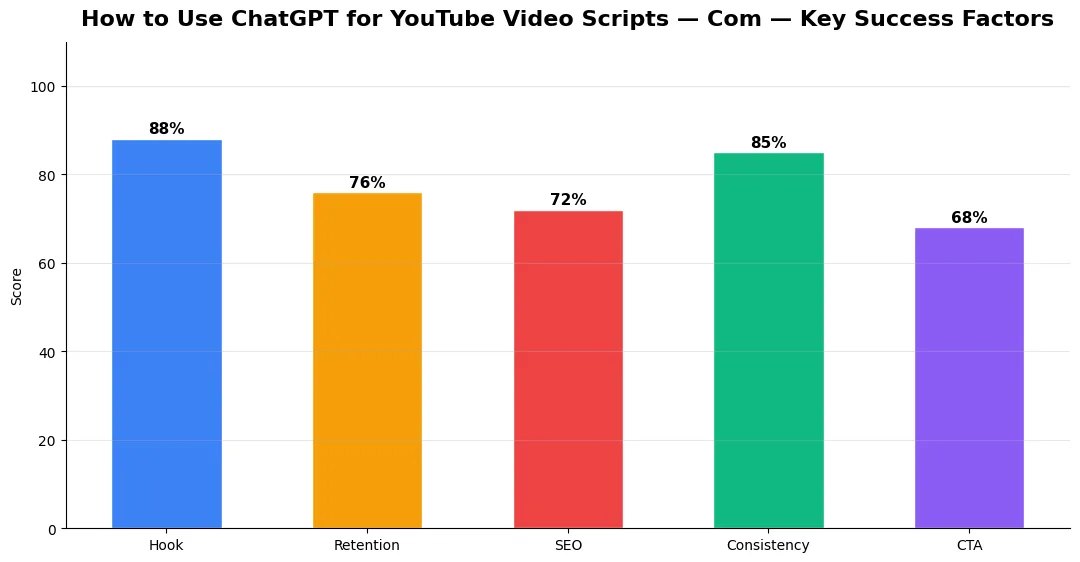
Every strong YouTube script follows a proven structure: a hook in the first 10 seconds, the main content body, and a closing call-to-action. Ask ChatGPT to break your script into these sections explicitly. You can prompt: “Structure this script with a curiosity-driven hook, four main points with examples, and a CTA asking viewers to subscribe.”
For tutorials or listicle videos, request numbered sections so your script matches on-screen graphics. ChatGPT handles transitions between sections well when you prompt it to keep the flow natural. This approach pairs perfectly with a broader script-to-upload creator toolkit workflow that covers every stage of production.
Limitations and Tips for Original Content
ChatGPT is a powerful starting point, but it is not a replacement for your unique voice. AI-generated scripts can sound generic if you publish them without editing. Always add personal stories, opinions, and real-world examples that only you can provide. This is what builds audience trust and keeps viewers coming back.
Another limitation is accuracy — ChatGPT may present outdated statistics or incorrect product details. Always fact-check data points before recording. For creators looking to explore more AI writing and optimization tools, our best free AI tools guide for YouTube creators covers the full landscape.
Once your script is ready, you still need compelling titles and descriptions to get clicks. The YT Title Description Generator app is a handy complement — it helps you craft SEO-optimized titles and descriptions directly from your finished ChatGPT scripts, saving time on metadata optimization.
ChatGPT Script Workflow — Comparison Table
| Step | Manual Scripting | ChatGPT-Assisted Scripting |
|---|---|---|
| Research & Outline | 60–90 minutes | 10–15 minutes |
| First Draft | 2–3 hours | 15–30 minutes |
| Hook Variations | Trial and error | Instant multiple options |
| Editing & Personalization | 30–60 minutes | 30–60 minutes (still needed) |
| SEO Metadata | Manual keyword research | Use AI tools + YT Title Description Generator app |
Conclusion
ChatGPT is a game-changer for YouTube scripting when used as a creative assistant rather than a replacement. Combine strong prompts with your own personality, fact-check everything, and pair your scripts with solid AI-powered title and tag generators for maximum reach. Start experimenting today and cut your scripting time in half.
👉 YouTube SEO Complete Guide — Rank Your Videos in 2026
👉 YouTube 2026 Creator Platform Changes — Complete Guide
Common Mistakes to Avoid in 2026
The fastest way to stall growth is copying trends without adapting them to your niche voice. Another frequent error is optimizing only for views while ignoring audience fit, which inflates vanity metrics but hurts monetization and brand deals later. Avoid posting on inconsistent schedules; algorithms and audiences both reward predictable cadence.
Do not neglect analytics review. Spend thirty minutes weekly on retention curves, traffic sources, and click-through rate on thumbnails. Small iterative fixes—tighter hooks, clearer titles, better pacing—often outperform chasing entirely new formats every week.
Tools and Resources That Save Time
Invest in lightweight tools that reduce friction: a caption workflow, a thumbnail template system, and a title/description helper so metadata stays consistent. The YT Title Description Generator app helps you draft SEO-friendly titles and descriptions quickly when you batch-upload multiple videos.
Keep a swipe file of hooks, titles, and thumbnails that performed well in your niche—not to copy, but to analyze patterns. Pair that with YouTube Studio analytics and one external keyword or trend tool so creative decisions stay grounded in data.
Step-by-Step Workflow for 2026
Start by defining one clear outcome for every piece of content you publish. Map the viewer journey from the first frame to the subscribe or click action, and remove any step that does not move that journey forward. Batch your research, scripting, and B-roll capture so you are not context-switching between creative and administrative tasks every day.
Use a simple checklist before upload: title clarity, thumbnail readability on mobile, hook strength in the first three seconds, captions accuracy, and end-screen placement. Creators who treat upload as a quality gate—not a rush job—see compounding gains in retention and discovery over 2026.
Measuring Success — Metrics That Matter
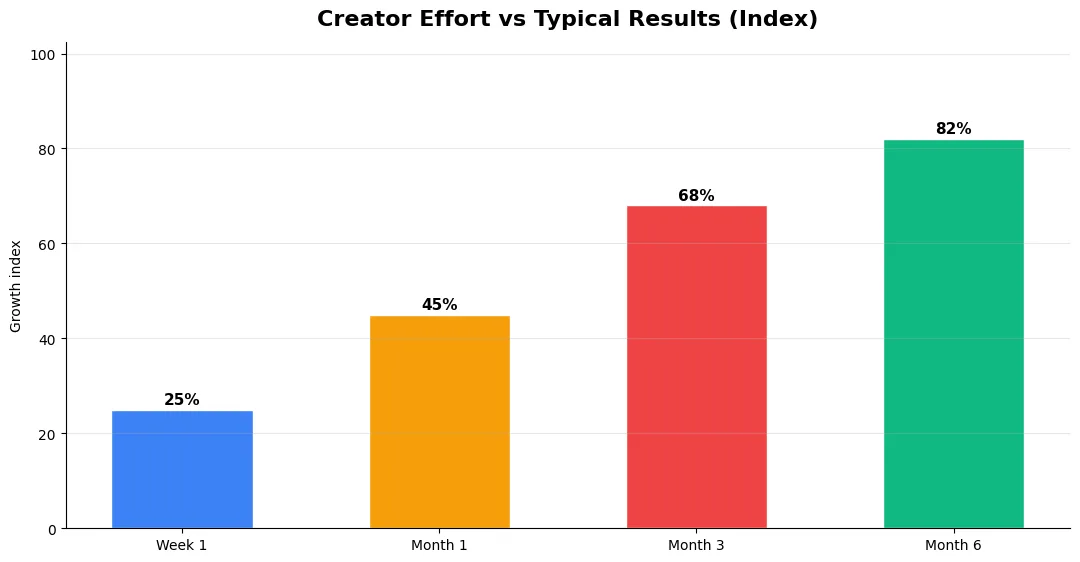
Track average view duration and audience retention before raw view count. Rising retention tells you the content matches the promise of your title and thumbnail; falling retention signals a hook or pacing problem. Monitor click-through rate separately—high CTR with low retention usually means the packaging oversold the video.
For growth channels, watch subscriber conversion per thousand views and returning viewer percentage. For monetized channels, revenue per mille and watch time from high-value geographies matter more than viral spikes from low-monetization regions. Set monthly targets for two metrics only; too many KPIs dilute focus.
| Level | Strategy | Typical outcome |
|---|---|---|
| Beginner approach | Copy trends blindly | Low retention, no brand |
| Structured approach | Test hooks + analyze data | Steady growth |
| Pro approach | Series + community loop | Higher LTV audience |
Can ChatGPT write a full YouTube script ready to record?
What is the best ChatGPT prompt for YouTube scripts?
Does using ChatGPT for scripts hurt YouTube SEO?
Final Verdict — How To Use Chatgpt For in 2026
Success with how to use chatgpt for comes from clarity, consistency, and honest delivery on every title and thumbnail promise. Use the step-by-step workflow, avoid the common mistakes above, and measure retention before chasing viral spikes. Small weekly improvements compound into channel growth that lasts beyond a single trending moment.
Also Read:


