Your thumbnail is the single biggest factor in whether someone clicks your video. But how do you know which thumbnail actually performs better? AI-powered A/B testing tools take the guesswork out of thumbnail design by showing different versions to real viewers and tracking click-through rates. In this article, we break down the best AI thumbnail A/B testing tools that actually work for YouTube in 2026, including YouTube’s own built-in feature.
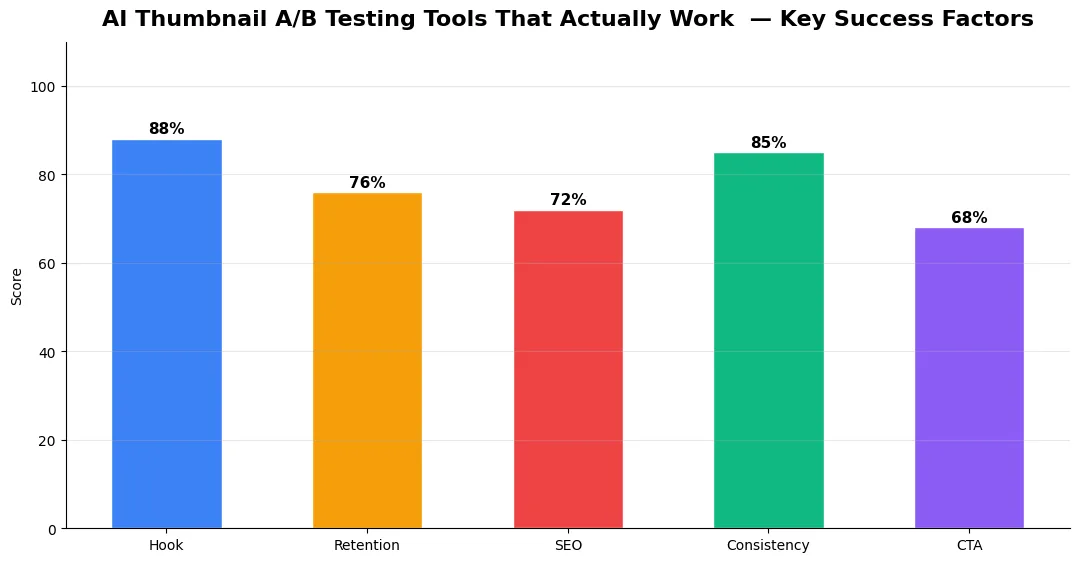
This guide covers ai thumbnail ab testing tools in plain language for creators in India, the US, the UK, and global audiences. Whether you are starting out or refining a channel that already earns views, the frameworks below help you work smarter—not just post more often. Read through the charts and comparison table, then apply one change per week so improvements stick.
How Thumbnail A/B Testing Works on YouTube
Thumbnail A/B testing shows two or more versions of your thumbnail to different segments of your audience. The tool then measures which version gets a higher click-through rate (CTR). YouTube introduced its own built-in A/B testing feature called “Test & Compare” inside YouTube Studio. You can upload up to three thumbnails per video, and YouTube will split traffic evenly across them. After enough data is collected, YouTube tells you which thumbnail won. This is a game-changer because the data comes directly from your real audience.
Best Third-Party Thumbnail Testing Tools
ThumbnailTest was one of the first dedicated A/B testing platforms for YouTube thumbnails. It works by running your thumbnail against competitor thumbnails or alternate versions, using a panel of real users who vote on which one they would click. The free plan lets you test a limited number of thumbnails per month, while the paid plan gives unlimited tests and detailed analytics. ThumbnailTest is useful for testing thumbnails before publishing, which YouTube’s built-in tool cannot do.
Sprizzy is primarily a YouTube promotion platform, but it includes thumbnail testing as part of its campaign tools. When you run a Sprizzy ad campaign, you can test multiple thumbnails and see which one drives more engagement from paid traffic. This is helpful for creators who already run paid promotions and want to optimize their creative assets at the same time.
TubeBuddy A/B Testing has offered thumbnail A/B testing for years through its browser extension. TubeBuddy swaps your thumbnail automatically over set intervals and measures CTR changes. The Legend plan includes this feature along with advanced analytics. While not as precise as YouTube’s native tool, TubeBuddy’s A/B testing works across your entire library of published videos.
Pairing strong thumbnails with optimized titles and metadata is essential — see our guide on the best free AI tools for YouTube titles, descriptions, and tags to complete your optimization workflow.
Comparison Table: Thumbnail A/B Testing Tools
| Tool | Testing Method | Free Plan | Best For |
|---|---|---|---|
| YouTube Test & Compare | Real audience split test inside Studio | Yes (built-in) | Post-publish testing with real data |
| ThumbnailTest | Voter panel comparison before upload | Limited free tests | Pre-publish thumbnail validation |
| Sprizzy | Ad campaign based testing | No (paid campaigns) | Creators running paid promotions |
| TubeBuddy | Automated thumbnail swap over time | No (Legend plan) | Testing across existing video library |
How to Interpret Your A/B Test Results
A higher CTR does not always mean a better thumbnail. Look at the full picture — check if the winning thumbnail also brings viewers who watch longer. A clickbait thumbnail might get more clicks but lower your average view duration, which hurts your ranking. YouTube’s algorithm values both CTR and watch time, so the best thumbnail is one that attracts clicks and keeps viewers engaged. Run your tests for at least seven days to get reliable data before making a final decision. If you want to understand how thumbnails fit into the broader ranking picture, read our complete YouTube SEO guide.
Conclusion
Thumbnail A/B testing is no longer optional if you want to maximize your video’s reach. YouTube’s built-in Test & Compare is the best starting point for most creators. Combine it with pre-publish tools like ThumbnailTest for a complete testing workflow. Small improvements in CTR can lead to significant growth over time.
👉 Best Free AI Tools for YouTube Creators — 2026 Guide
👉 YouTube Creator Toolkit: Script to Upload in 2026
Measuring Success — Metrics That Matter
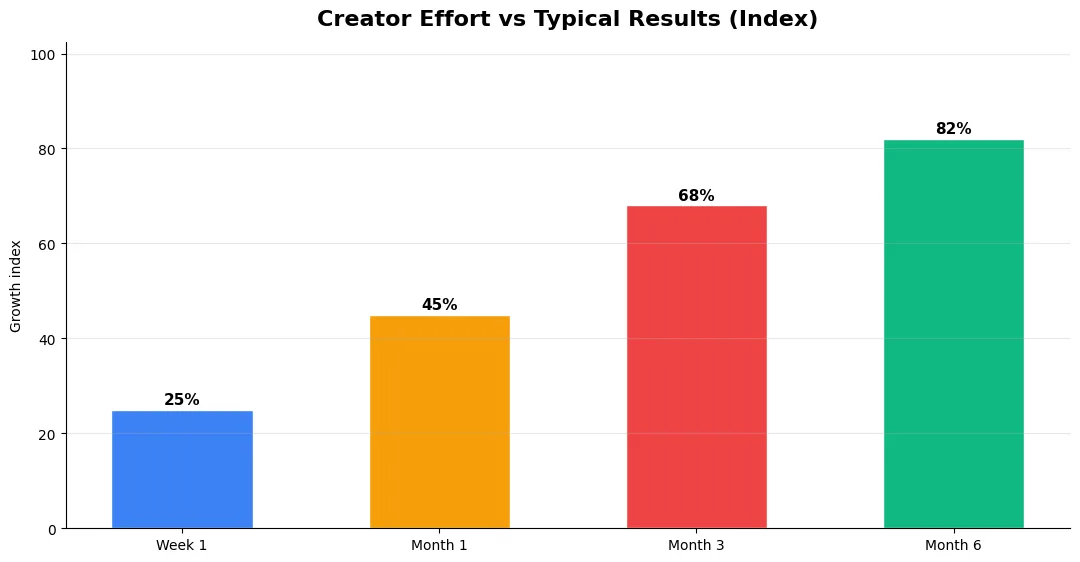
Track average view duration and audience retention before raw view count. Rising retention tells you the content matches the promise of your title and thumbnail; falling retention signals a hook or pacing problem. Monitor click-through rate separately—high CTR with low retention usually means the packaging oversold the video.
For growth channels, watch subscriber conversion per thousand views and returning viewer percentage. For monetized channels, revenue per mille and watch time from high-value geographies matter more than viral spikes from low-monetization regions. Set monthly targets for two metrics only; too many KPIs dilute focus.
Step-by-Step Workflow for 2026
Start by defining one clear outcome for every piece of content you publish. Map the viewer journey from the first frame to the subscribe or click action, and remove any step that does not move that journey forward. Batch your research, scripting, and B-roll capture so you are not context-switching between creative and administrative tasks every day.
Use a simple checklist before upload: title clarity, thumbnail readability on mobile, hook strength in the first three seconds, captions accuracy, and end-screen placement. Creators who treat upload as a quality gate—not a rush job—see compounding gains in retention and discovery over 2026.
Advanced Tips for Competitive Niches
In saturated niches, specificity wins. Narrow your positioning until you can describe your ideal viewer in one sentence, then speak directly to that person in every title and hook. Collaborate with adjacent creators whose audiences overlap but are not identical—this expands reach without diluting brand identity.
Repurpose top performers into Shorts, community posts, and newsletter snippets to extract more value from proven ideas. Update evergreen videos when platforms change features; refreshed metadata and a pinned comment with the latest link can revive older assets.
Common Mistakes to Avoid in 2026
The fastest way to stall growth is copying trends without adapting them to your niche voice. Another frequent error is optimizing only for views while ignoring audience fit, which inflates vanity metrics but hurts monetization and brand deals later. Avoid posting on inconsistent schedules; algorithms and audiences both reward predictable cadence.
Do not neglect analytics review. Spend thirty minutes weekly on retention curves, traffic sources, and click-through rate on thumbnails. Small iterative fixes—tighter hooks, clearer titles, better pacing—often outperform chasing entirely new formats every week.
| Level | Strategy | Typical outcome |
|---|---|---|
| Beginner approach | Copy trends blindly | Low retention, no brand |
| Structured approach | Test hooks + analyze data | Steady growth |
| Pro approach | Series + community loop | Higher LTV audience |
Does YouTube have a built-in thumbnail A/B testing tool?
How long should I run a thumbnail A/B test?
Can I A/B test thumbnails before publishing a video?
Final Verdict — Ai Thumbnail Ab Testing Tools in 2026
Success with ai thumbnail ab testing tools comes from clarity, consistency, and honest delivery on every title and thumbnail promise. Use the step-by-step workflow, avoid the common mistakes above, and measure retention before chasing viral spikes. Small weekly improvements compound into channel growth that lasts beyond a single trending moment.
Also Read:


