
Every successful YouTube channel is built on a foundation of data-driven decisions. YouTube Analytics holds the answers to your biggest content questions — what topics your audience craves, where your viewers come from, and which videos have untapped potential. The problem is that most creators only glance at view counts and subscriber numbers. In 2026, learning to read analytics deeply is the difference between guessing and growing. Here is how to mine your analytics dashboard for winning content ideas.
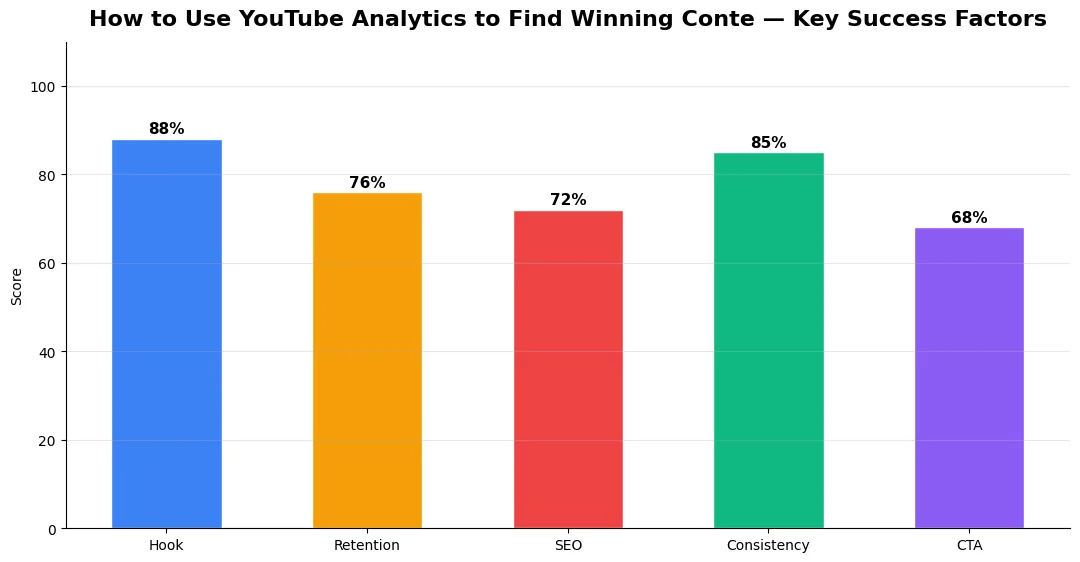
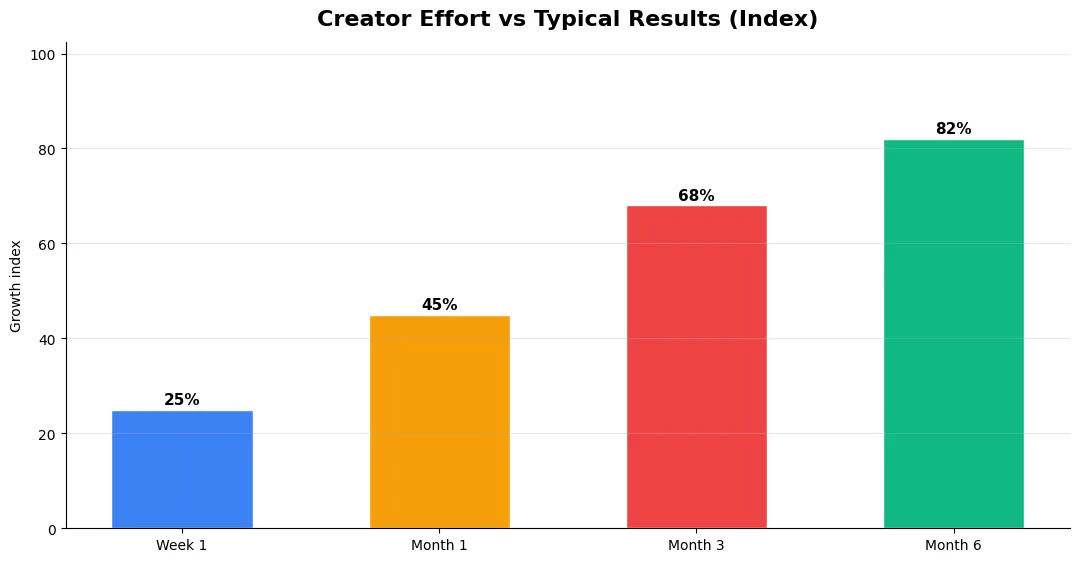
This guide covers how to use youtube analytics in plain language for creators in India, the US, the UK, and global audiences. Whether you are starting out or refining a channel that already earns views, the frameworks below help you work smarter—not just post more often. Read through the charts and comparison table, then apply one change per week so improvements stick.
Traffic Sources Tell You Where to Double Down
Your Traffic Sources report reveals how viewers find your videos. YouTube Search traffic means your titles and tags are working — dig into the exact search terms viewers used to find you. If a specific keyword drives consistent traffic, create more videos targeting related long-tail variations. Browse Features traffic indicates the algorithm is recommending your content, which means your click-through rate and retention are strong for those topics. External traffic from Google Search suggests your content answers real questions people type into search engines, and you should consider creating companion blog posts to capture even more of that demand.
Pay special attention to the “YouTube Search” terms report inside the Reach tab. It shows the actual queries viewers typed before clicking your video. These are gold — they reveal exactly what language your audience uses and what problems they want solved. Build a spreadsheet of these terms and group them by theme to generate your next batch of video ideas.
Key Analytics Metrics and What They Reveal
Not all metrics are created equal. This table maps the most important analytics data points to actionable content strategy insights.
| Metric | Where to Find It | What It Reveals for Content Strategy |
|---|---|---|
| Search Terms | Reach Tab → Traffic Source: YouTube Search | Exact topics and keywords your audience wants |
| Average View Duration | Engagement Tab | Which video structures keep viewers watching longest |
| Click-Through Rate (CTR) | Reach Tab | How compelling your titles and thumbnails are per topic |
| Returning Viewers | Audience Tab | Whether your content builds loyalty or attracts one-time viewers |
| Real-Time Views | Overview | Early momentum signals for newly published videos |
| Audience Retention Curve | Video-Level Analytics | Exact moments viewers drop off — reveals pacing and content issues |
| Traffic from Suggested | Reach Tab → Traffic Source: Suggested | Which of your videos the algorithm actively promotes |
Using Audience Insights to Predict What Works
The Audience tab shows you when your viewers are online, what other channels they watch, and what other videos they consume. This data is incredibly powerful for content ideation. If your audience also watches channels in a related niche you have not covered, that is a content gap you can fill. The “Other Videos Your Audience Watched” section frequently surfaces trending topics before they peak, giving you a first-mover advantage.
Combine these insights with analytics tools beyond YouTube Studio for deeper competitive analysis. Third-party tools can show you competitor keyword gaps, estimated revenue per video, and historical performance trends that YouTube’s native dashboard does not provide. Understanding engaged views as a metric also helps you separate passive impressions from genuinely interested viewers when evaluating content performance.
Turning Data Into a Content Pipeline
Raw data is useless without a system to act on it. Set a weekly analytics review — every Monday, spend 20 minutes scanning your top-performing search terms, highest-retention videos, and audience behavior shifts. Maintain a running list of content ideas ranked by data confidence. A topic that appears in your search terms, aligns with audience interests, and has a proven retention pattern in similar videos should jump to the top of your production queue.
Also compare your analytics over 28-day and 90-day windows to distinguish trends from noise. A single viral video can skew weekly data, but quarterly patterns reveal your true growth trajectory. Creators who understand the recommendation engine’s behavior can align their content pipeline with algorithmic preferences, creating a virtuous cycle of data-informed publishing and growing reach.
Advanced Tips for Competitive Niches
In saturated niches, specificity wins. Narrow your positioning until you can describe your ideal viewer in one sentence, then speak directly to that person in every title and hook. Collaborate with adjacent creators whose audiences overlap but are not identical—this expands reach without diluting brand identity.
Repurpose top performers into Shorts, community posts, and newsletter snippets to extract more value from proven ideas. Update evergreen videos when platforms change features; refreshed metadata and a pinned comment with the latest link can revive older assets.
Tools and Resources That Save Time
Invest in lightweight tools that reduce friction: a caption workflow, a thumbnail template system, and a title/description helper so metadata stays consistent. The YT Title Description Generator app helps you draft SEO-friendly titles and descriptions quickly when you batch-upload multiple videos.
Keep a swipe file of hooks, titles, and thumbnails that performed well in your niche—not to copy, but to analyze patterns. Pair that with YouTube Studio analytics and one external keyword or trend tool so creative decisions stay grounded in data.
Common Mistakes to Avoid in 2026
The fastest way to stall growth is copying trends without adapting them to your niche voice. Another frequent error is optimizing only for views while ignoring audience fit, which inflates vanity metrics but hurts monetization and brand deals later. Avoid posting on inconsistent schedules; algorithms and audiences both reward predictable cadence.
Do not neglect analytics review. Spend thirty minutes weekly on retention curves, traffic sources, and click-through rate on thumbnails. Small iterative fixes—tighter hooks, clearer titles, better pacing—often outperform chasing entirely new formats every week.
Step-by-Step Workflow for 2026
Start by defining one clear outcome for every piece of content you publish. Map the viewer journey from the first frame to the subscribe or click action, and remove any step that does not move that journey forward. Batch your research, scripting, and B-roll capture so you are not context-switching between creative and administrative tasks every day.
Use a simple checklist before upload: title clarity, thumbnail readability on mobile, hook strength in the first three seconds, captions accuracy, and end-screen placement. Creators who treat upload as a quality gate—not a rush job—see compounding gains in retention and discovery over 2026.
| Level | Strategy | Typical outcome |
|---|---|---|
| Beginner approach | Copy trends blindly | Low retention, no brand |
| Structured approach | Test hooks + analyze data | Steady growth |
| Pro approach | Series + community loop | Higher LTV audience |
What is the most important YouTube Analytics metric for content ideas?
How often should I check YouTube Analytics?
Can YouTube Analytics show me what competitors are doing?
What does a low click-through rate mean in YouTube Analytics?
Final Verdict — How To Use Youtube Analytics in 2026
Success with how to use youtube analytics comes from clarity, consistency, and honest delivery on every title and thumbnail promise. Use the step-by-step workflow, avoid the common mistakes above, and measure retention before chasing viral spikes. Small weekly improvements compound into channel growth that lasts beyond a single trending moment.
Also Read:


