YouTube is blending Shorts with still images: image posts can appear in the Shorts feed as swipeable cards, so you can share tips, memes, or product shots with less video work. If you already invest in Shorts, this is another discovery surface—but attention rules stay strict. Below: what image posts are, how they compare to video Shorts, and how they differ from carousel habits elsewhere.
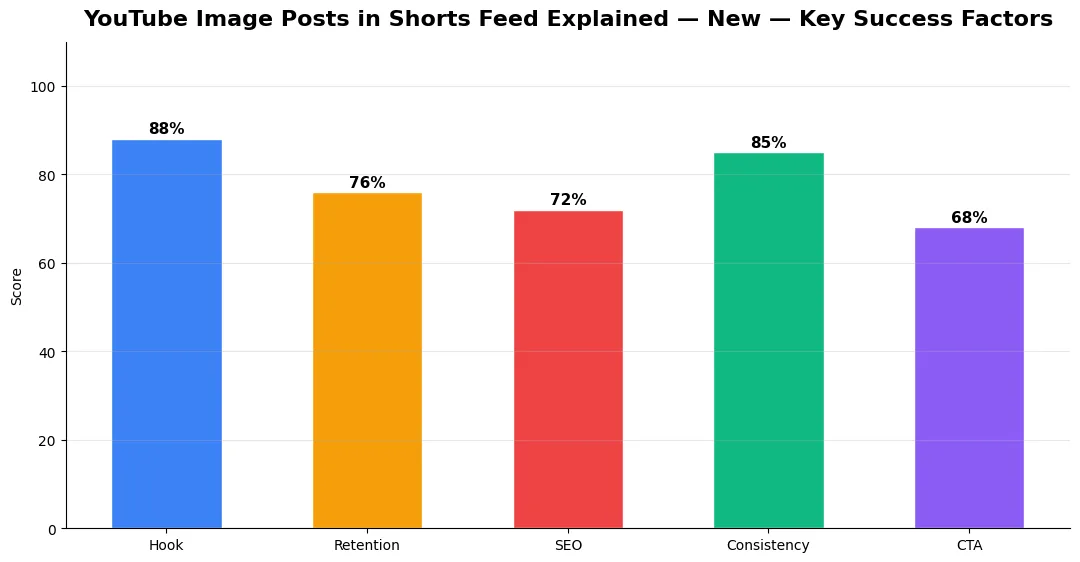
This guide covers youtube image posts in shorts in plain language for creators in India, the US, the UK, and global audiences. Whether you are starting out or refining a channel that already earns views, the frameworks below help you work smarter—not just post more often. Read through the charts and comparison table, then apply one change per week so improvements stick.
What image posts are and how they show up
Image posts are static visuals packaged in a vertical, Shorts-like unit. Viewers may see one frame or a small set of slides depending on rollout and client version. They load quickly on slower connections, which helps educational and news-adjacent creators deliver a single punchy idea. Think of them as billboards inside a feed built for motion: your text overlay, branding, and first slide must do the selling instantly.
Engagement compared with video Shorts
Early signals suggest video Shorts still drive longer average watch when motion and audio hook viewers. Image posts can earn strong saves and shares when the visual is self-explanatory—cheat sheets, before-and-after stills, or quote cards. Pair image posts with a linked long video or playlist so curious viewers have somewhere to go next. Layering formats is part of modern content sequencing, so the feed teases while your long-form deepens the story.
Track which image posts pull subscribers versus one-off likes; that split tells you when to double down on educational carousels versus entertainment memes.
How creators can use them and best practices
Use high-contrast typography, one idea per slide, and a consistent color system so fans recognize your brand in a blink. Add captions for accessibility and silent scrolling. Test hooks borrowed from micro-drama pacing—curiosity, a bold claim, then a payoff slide—even without video. If you run faceless workflows, image posts fit neatly alongside automated thumbnails; see building a faceless YouTube channel with AI tools for production stacks that scale static and video together.
YouTube image posts versus Instagram carousels
Instagram carousels train audiences to swipe for storytelling arcs; YouTube image posts sit inside a Shorts mindset—faster skips, stronger competition from video neighbors. On YouTube, prioritize clarity over artistic ambiguity. Save multi-slide essays for when the platform fully supports richer galleries; until then, design each slide to stand alone.
| Factor | YouTube image post (Shorts feed) | Instagram carousel |
|---|---|---|
| Primary intent | Discovery next to video Shorts | Profile and Explore browsing |
| Audio role | Optional; silent scroll common | Often paired with music or voice trends |
| Story depth | Favor single-shot clarity | Multi-slide arcs common |
| Monetization path | Funnels to long-form, memberships, off-platform | Shops, DMs, branded partnerships |
For sponsorship math and platform tooling, keep an eye on how YouTube surfaces brand deals; the 2026 creator platform changes guide connects format experiments to broader monetization shifts.
Also read
Advanced Tips for Competitive Niches
In saturated niches, specificity wins. Narrow your positioning until you can describe your ideal viewer in one sentence, then speak directly to that person in every title and hook. Collaborate with adjacent creators whose audiences overlap but are not identical—this expands reach without diluting brand identity.
Repurpose top performers into Shorts, community posts, and newsletter snippets to extract more value from proven ideas. Update evergreen videos when platforms change features; refreshed metadata and a pinned comment with the latest link can revive older assets.
Common Mistakes to Avoid in 2026
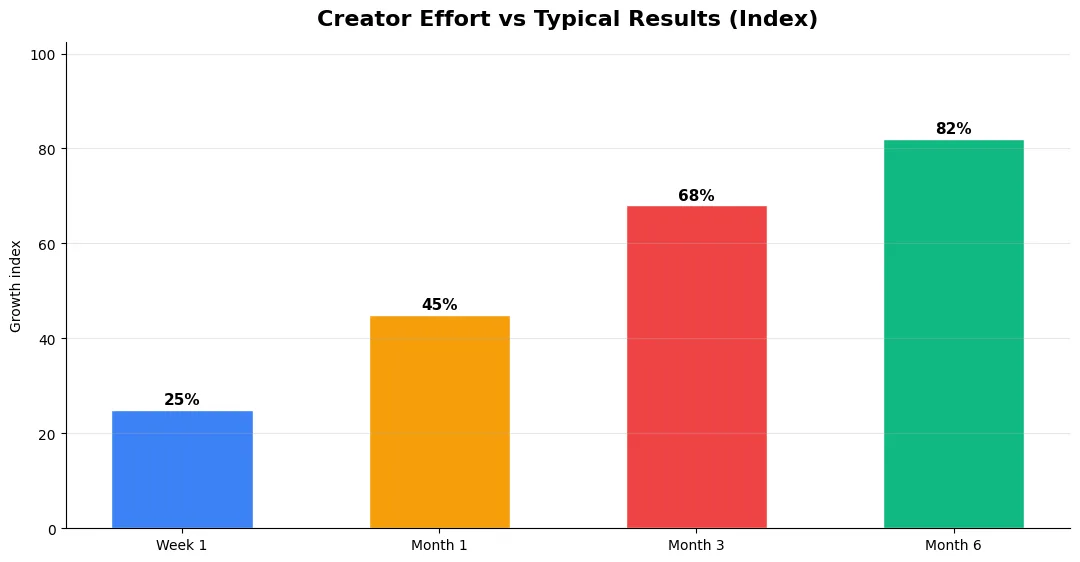
The fastest way to stall growth is copying trends without adapting them to your niche voice. Another frequent error is optimizing only for views while ignoring audience fit, which inflates vanity metrics but hurts monetization and brand deals later. Avoid posting on inconsistent schedules; algorithms and audiences both reward predictable cadence.
Do not neglect analytics review. Spend thirty minutes weekly on retention curves, traffic sources, and click-through rate on thumbnails. Small iterative fixes—tighter hooks, clearer titles, better pacing—often outperform chasing entirely new formats every week.
Tools and Resources That Save Time
Invest in lightweight tools that reduce friction: a caption workflow, a thumbnail template system, and a title/description helper so metadata stays consistent. The YT Title Description Generator app helps you draft SEO-friendly titles and descriptions quickly when you batch-upload multiple videos.
Keep a swipe file of hooks, titles, and thumbnails that performed well in your niche—not to copy, but to analyze patterns. Pair that with YouTube Studio analytics and one external keyword or trend tool so creative decisions stay grounded in data.
Measuring Success — Metrics That Matter
Track average view duration and audience retention before raw view count. Rising retention tells you the content matches the promise of your title and thumbnail; falling retention signals a hook or pacing problem. Monitor click-through rate separately—high CTR with low retention usually means the packaging oversold the video.
For growth channels, watch subscriber conversion per thousand views and returning viewer percentage. For monetized channels, revenue per mille and watch time from high-value geographies matter more than viral spikes from low-monetization regions. Set monthly targets for two metrics only; too many KPIs dilute focus.
| Level | Strategy | Typical outcome |
|---|---|---|
| Beginner approach | Copy trends blindly | Low retention, no brand |
| Structured approach | Test hooks + analyze data | Steady growth |
| Pro approach | Series + community loop | Higher LTV audience |
Do image posts replace video Shorts?
No. They complement video by covering quick tips or announcements with less production time while you keep motion-led Shorts for retention-heavy ideas.
What dimensions work best?
Use vertical 9:16 safe zones, large type, and keep key text inside the center third so UI overlays do not cover it.
Can image posts hurt my channel if performance is weak?
Treat them as experiments. If a batch underperforms, refine hooks and branding rather than abandoning the format entirely.
Should I cross-post carousel art from Instagram?
You can repurpose assets, but re-export with YouTube-safe margins and faster-readable copy because skip behavior differs from Instagram swipes.
Image posts in the Shorts feed are a practical bridge between static design skills and YouTube’s fastest surface. Lead with clarity, test against your video Shorts, and route viewers to deeper content. Used thoughtfully, they diversify your publishing without doubling your edit time.
Final Verdict — Youtube Image Posts In Shorts in 2026
Success with youtube image posts in shorts comes from clarity, consistency, and honest delivery on every title and thumbnail promise. Use the step-by-step workflow, avoid the common mistakes above, and measure retention before chasing viral spikes. Small weekly improvements compound into channel growth that lasts beyond a single trending moment.
Also Read:


