Talking head videos engaging YouTube audiences in 2026 require more than a good script: framing, rhythm, and visual variety signal that a single-speaker video is worth finishing. When the face is the main prop, boredom arrives from static composition and flat energy long before the idea runs out of steam. Use the tactics below to keep viewers watching without turning every video into a full studio production.
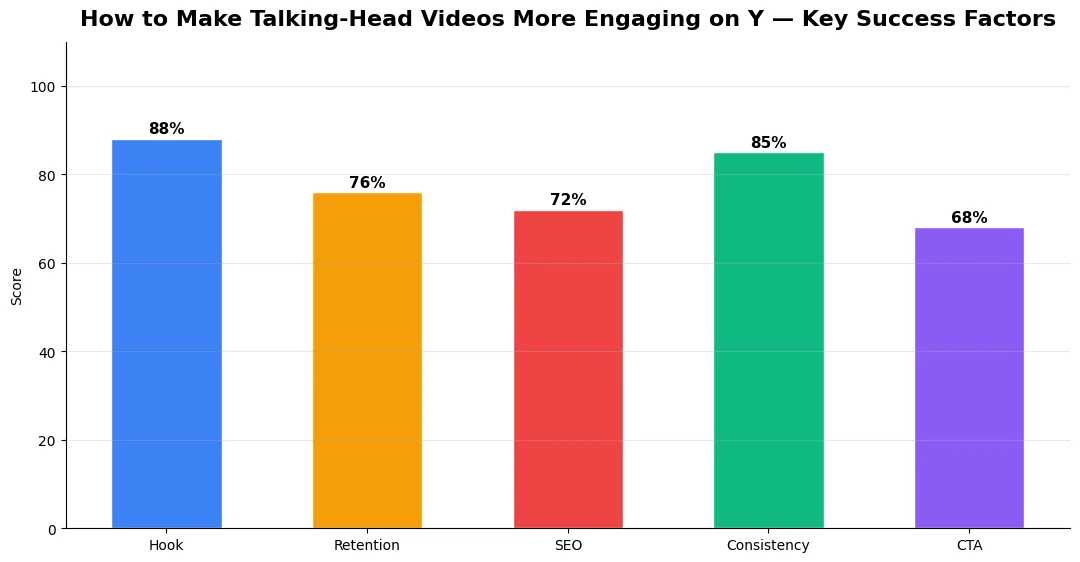
This guide covers how to make talkinghead videos in plain language for creators in India, the US, the UK, and global audiences. Whether you are starting out or refining a channel that already earns views, the frameworks below help you work smarter—not just post more often. Read through the charts and comparison table, then apply one change per week so improvements stick.
Camera, Framing, and Energy That Read on Small Screens
Place the eyes on the upper third, leave leading room toward your key graphic side, and vary distance—medium for authority, slightly closer for emphasis—within the same take using punch-ins in edit if you must stay solo. Light the face evenly; harsh shadows read as low effort on phones. For packaging that gets the click before the camera matters, study how to increase YouTube CTR with better thumbnails in 2026. Anchor your format choices using every YouTube content format explained so talking-head episodes sit clearly inside your channel strategy.
Editing Rhythm and B-Roll That Support the Argument
Cut on thought boundaries, not only breaths; silence after a punchline can land harder than another jump cut. Layer lower-thirds for names, dates, and definitions; use simple diagrams or screen captures when the claim needs evidence. If your topic benefits from longer narrative arcs, borrow pacing ideas from YouTube documentary-style storytelling—chapter cards, scene changes, and reflective beats—scaled down for desk setups. When a section is dense, drop a two-line on-screen recap before moving on; viewers who glance away for a second can re-enter without rewinding the entire argument.
Talking Head Videos Engaging YouTube Viewers: Story First
Open with tension: a question, a mistake you made, or a contrarian one-liner tied to the outcome. Return to that thread every few minutes so the video feels like a journey, not a lecture. Use verbal signposting—“first principle,” “here is the trap,” “what I would do next week”—so skimmers can re-anchor. End with one actionable step and a single sentence that previews the next upload’s problem. If you teach, state the mistake you see in comments first; empathy keeps viewers listening through the correction.
| Technique | Engagement effect | Effort level |
|---|---|---|
| Punch-in on key lines | Refocuses attention | Low |
| On-screen keywords | Aids retention and skimming | Low |
| B-roll or screen proof | Validates claims visually | Medium |
| Chapter markers | Reduces abandonment mid-video | Low |
Retention Habits That Compound
Study audience retention graphs for the first two minutes separately from the middle; most talking-head drops trace back to slow opens or list drifts without payoff. Record a cold open and a warm take, then choose the one that states the stakes faster. Batch film intros when energy is highest. Small upgrades in vocal range and gesture beat expensive lenses if the idea is already sharp. Revisit older hits quarterly: tighten the first ninety seconds, refresh examples, and add chapters so returning viewers see a reason to rewatch instead of bouncing to a competitor’s recap.
Measuring Success — Metrics That Matter
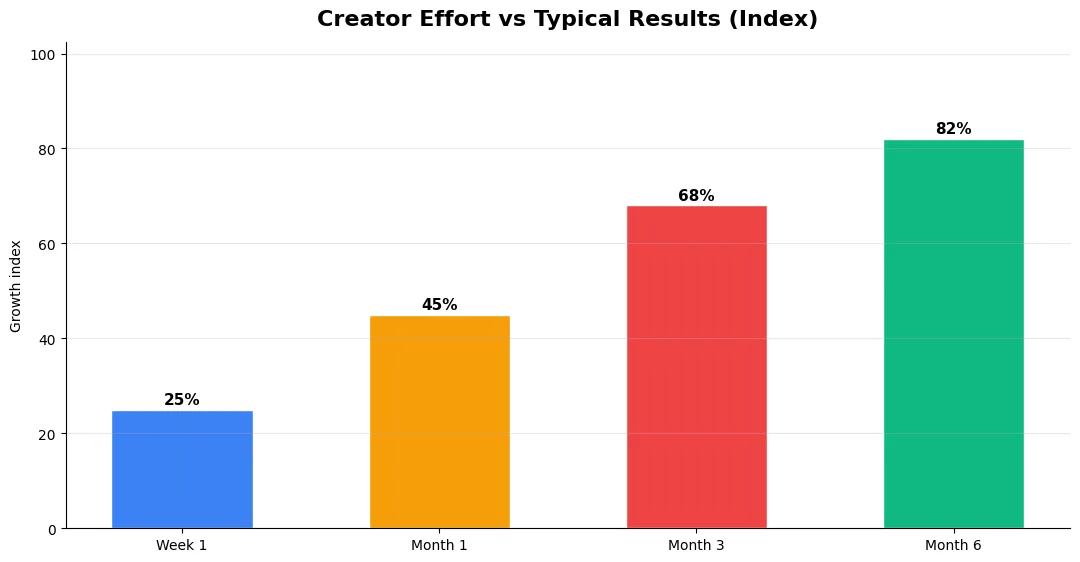
Track average view duration and audience retention before raw view count. Rising retention tells you the content matches the promise of your title and thumbnail; falling retention signals a hook or pacing problem. Monitor click-through rate separately—high CTR with low retention usually means the packaging oversold the video.
For growth channels, watch subscriber conversion per thousand views and returning viewer percentage. For monetized channels, revenue per mille and watch time from high-value geographies matter more than viral spikes from low-monetization regions. Set monthly targets for two metrics only; too many KPIs dilute focus.
Step-by-Step Workflow for 2026
Start by defining one clear outcome for every piece of content you publish. Map the viewer journey from the first frame to the subscribe or click action, and remove any step that does not move that journey forward. Batch your research, scripting, and B-roll capture so you are not context-switching between creative and administrative tasks every day.
Use a simple checklist before upload: title clarity, thumbnail readability on mobile, hook strength in the first three seconds, captions accuracy, and end-screen placement. Creators who treat upload as a quality gate—not a rush job—see compounding gains in retention and discovery over 2026.
Tools and Resources That Save Time
Invest in lightweight tools that reduce friction: a caption workflow, a thumbnail template system, and a title/description helper so metadata stays consistent. The YT Title Description Generator app helps you draft SEO-friendly titles and descriptions quickly when you batch-upload multiple videos.
Keep a swipe file of hooks, titles, and thumbnails that performed well in your niche—not to copy, but to analyze patterns. Pair that with YouTube Studio analytics and one external keyword or trend tool so creative decisions stay grounded in data.
Advanced Tips for Competitive Niches
In saturated niches, specificity wins. Narrow your positioning until you can describe your ideal viewer in one sentence, then speak directly to that person in every title and hook. Collaborate with adjacent creators whose audiences overlap but are not identical—this expands reach without diluting brand identity.
Repurpose top performers into Shorts, community posts, and newsletter snippets to extract more value from proven ideas. Update evergreen videos when platforms change features; refreshed metadata and a pinned comment with the latest link can revive older assets.
| Level | Strategy | Typical outcome |
|---|---|---|
| Beginner approach | Copy trends blindly | Low retention, no brand |
| Structured approach | Test hooks + analyze data | Steady growth |
| Pro approach | Series + community loop | Higher LTV audience |
How do I make talking head videos engaging YouTube viewers on mobile?
Use tighter framing variations, on-screen text for key claims, faster early pacing, and proof visuals. Chapters help viewers stay when they join mid-video.
Do I need multiple cameras for talking-head content?
No. One camera plus thoughtful punch-ins, graphics, and b-roll is enough. Add a second angle only if it speeds your workflow or improves authenticity.
What is the biggest mistake in talking-head videos?
A slow, vague open without a clear problem or outcome. State stakes early, then deliver evidence and a single memorable takeaway.
How often should I cut in a talking-head edit?
Enough to remove dead air and emphasize beats, not so much that it feels nervous. Let a strong line breathe when the emotion matters.
Final Verdict — How To Make Talkinghead Videos in 2026
Success with how to make talkinghead videos comes from clarity, consistency, and honest delivery on every title and thumbnail promise. Use the step-by-step workflow, avoid the common mistakes above, and measure retention before chasing viral spikes. Small weekly improvements compound into channel growth that lasts beyond a single trending moment.
Also Read:


