
YouTube creators around the world just got a powerful new tool to supercharge their content creation journey. Google has officially announced that the Inspiration Tab, equipped with AI-assisted video idea brainstorming, is now available globally in YouTube Studio desktop.
This guide covers youtube studio desktop rolls out in plain language for creators in India, the US, the UK, and global audiences. Whether you are starting out or refining a channel that already earns views, the frameworks below help you work smarter—not just post more often. Read through the charts and comparison table, then apply one change per week so improvements stick.
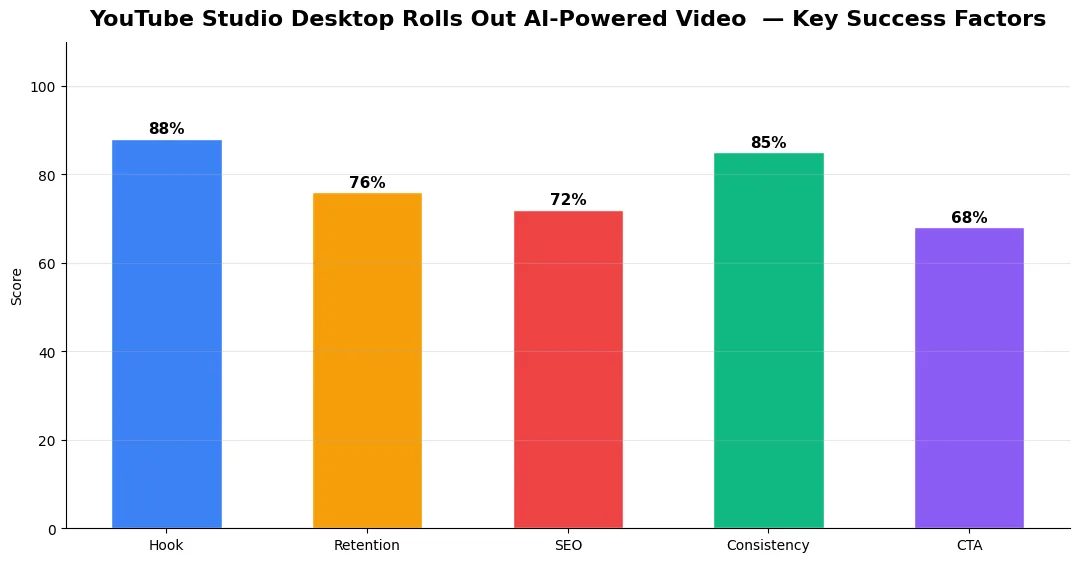
This exciting update is designed to help creators brainstorm fresh content ideas, discover trending topics, and refine their creative direction with the support of artificial intelligence. Let’s dive deep into what this means for YouTubers, how it works, and why it could change the way creators produce videos.
What is the YouTube Studio Inspiration Tab?
The Inspiration Tab is a new section inside YouTube Studio desktop that gives creators insights into:
- Trending video ideas related to their niche.
- AI-generated content suggestions based on audience interests.
- Performance data that shows what’s working for similar creators.
- Personalized recommendations for topics likely to engage their subscribers.
Think of it as your personal brainstorming assistant — but backed by YouTube’s massive data and AI technology. Instead of guessing what to create next, creators can now see evidence-backed suggestions powered by AI.
How Does AI-Assisted Brainstorming Work?
The AI-assisted video idea brainstorming feature goes beyond simple keyword suggestions. It analyzes:
- Your channel performance – videos that worked well in the past.
- Audience interests – what your subscribers are currently watching.
- Global and local trends – what’s rising in popularity worldwide or in your region.
- Niche-specific insights – tailored ideas relevant to your content category.
Based on this, AI suggests video topics, titles, and potential directions. For example, if you run a tech channel, the Inspiration Tab may recommend content like:
- “Top 5 AI Tools Changing Productivity in 2025”
- “Hands-on Review of the Latest Foldable Smartphones”
- “Beginner’s Guide to Using YouTube Studio’s New AI Tools”
This isn’t just generic brainstorming — it’s smart, data-driven ideation.
Why This Matters for Creators
YouTube is an ever-changing platform where staying relevant is a challenge. Many creators struggle with creator’s block or spend hours researching ideas that may never resonate. The Inspiration Tab solves these issues by providing:
- Time-saving suggestions – no more endless brainstorming.
- Content confidence – knowing that the idea is backed by audience data.
- Competitive advantage – early access to trending topics before others.
- Consistency boost – helping creators maintain regular uploads.
With AI in YouTube Studio, creators don’t just create content — they create optimized, audience-focused videos with higher chances of success.
Key Features of the Inspiration Tab
Here are the highlights of the new Inspiration Tab inside YouTube Studio desktop:
1. AI Video Idea Generator
AI-powered brainstorming delivers a list of potential topics, customized to your channel’s niche.
2. Trending Content Insights
Shows what’s currently trending across YouTube, giving creators a chance to ride the wave.
3. Audience-Centric Suggestions
Find out what your subscribers are searching for or watching outside your channel.
4. Data-Driven Recommendations
The system uses YouTube’s analytics and Google AI to predict what’s likely to perform well.
5. Global Rollout
Previously tested in limited regions, this feature is now available to all creators worldwide on desktop.
How to Access the Inspiration Tab
Getting started is simple:
- Log in to your YouTube Studio desktop account.
- On the left sidebar, look for the Inspiration Tab (under Analytics or Research tools).
- Explore AI-generated ideas, trending content, and audience insights.
- Select the ideas you like, save them, and start planning your next upload.
Currently, the Inspiration Tab is available only on desktop, but YouTube may extend it to mobile apps in the future.
How Creators Can Use This Feature Effectively
While AI suggestions are powerful, the real magic happens when creators blend them with their unique voice and creativity. Here’s how to maximize the Inspiration Tab:
- Customize ideas – Add your personality instead of following AI-generated titles word for word.
- Check competition – See how other creators approach similar topics and add your unique twist.
- Plan series – If you find a hot topic, create multiple videos exploring different angles.
- Mix trends with evergreen – Use trending topics for quick views and evergreen content for long-term growth.
SEO and Growth Potential
Since the Inspiration Tab is powered by YouTube’s search and recommendation algorithms, using its suggestions can naturally align your content with what the platform is already promoting. This could mean:
- Higher visibility in YouTube search results.
- Increased chances of appearing in Suggested Videos.
- More accurate targeting of audience intent.
In other words, this tool doesn’t just help with brainstorming — it helps with SEO-friendly content planning.
Final Thoughts
The launch of the Inspiration Tab with AI-assisted video idea brainstorming marks a huge step forward for YouTube creators. With the power of AI, creators can brainstorm smarter, save time, and create videos that resonate with their audiences worldwide.
Whether you’re a beginner or an established YouTuber, this feature gives you a competitive advantage in today’s fast-paced content world. By combining AI-driven suggestions with your unique storytelling, you can consistently deliver videos that attract, engage, and grow your audience.
Now that the feature is available globally, it’s the perfect time to explore the Inspiration Tab inside YouTube Studio desktop and let AI guide your next viral idea.
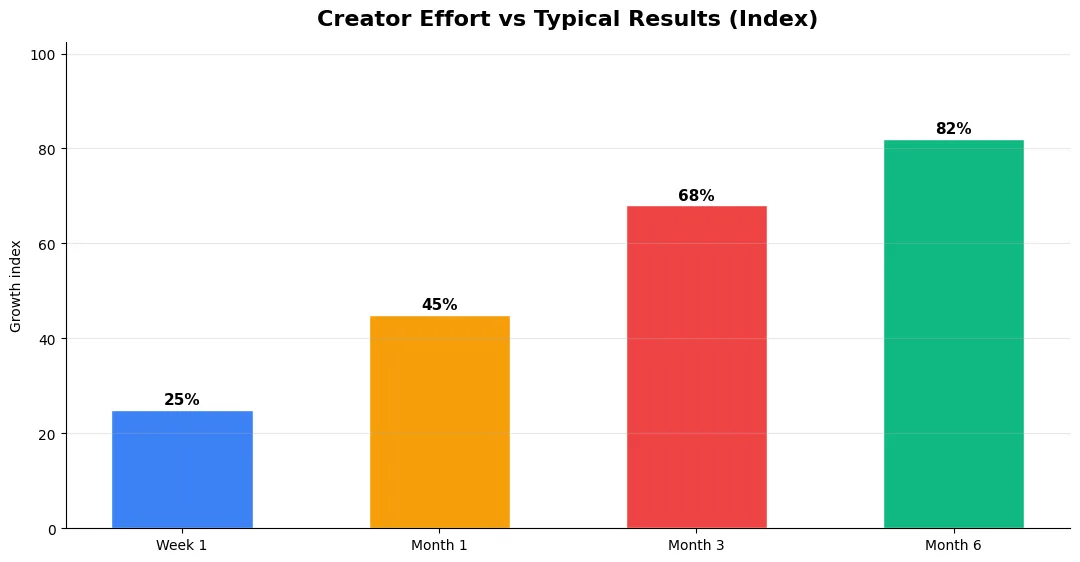
Step-by-Step Workflow for 2026
Start by defining one clear outcome for every piece of content you publish. Map the viewer journey from the first frame to the subscribe or click action, and remove any step that does not move that journey forward. Batch your research, scripting, and B-roll capture so you are not context-switching between creative and administrative tasks every day.
Use a simple checklist before upload: title clarity, thumbnail readability on mobile, hook strength in the first three seconds, captions accuracy, and end-screen placement. Creators who treat upload as a quality gate—not a rush job—see compounding gains in retention and discovery over 2026.
Tools and Resources That Save Time
Invest in lightweight tools that reduce friction: a caption workflow, a thumbnail template system, and a title/description helper so metadata stays consistent. The YT Title Description Generator app helps you draft SEO-friendly titles and descriptions quickly when you batch-upload multiple videos.
Keep a swipe file of hooks, titles, and thumbnails that performed well in your niche—not to copy, but to analyze patterns. Pair that with YouTube Studio analytics and one external keyword or trend tool so creative decisions stay grounded in data.
Common Mistakes to Avoid in 2026
The fastest way to stall growth is copying trends without adapting them to your niche voice. Another frequent error is optimizing only for views while ignoring audience fit, which inflates vanity metrics but hurts monetization and brand deals later. Avoid posting on inconsistent schedules; algorithms and audiences both reward predictable cadence.
Do not neglect analytics review. Spend thirty minutes weekly on retention curves, traffic sources, and click-through rate on thumbnails. Small iterative fixes—tighter hooks, clearer titles, better pacing—often outperform chasing entirely new formats every week.
Measuring Success — Metrics That Matter
Track average view duration and audience retention before raw view count. Rising retention tells you the content matches the promise of your title and thumbnail; falling retention signals a hook or pacing problem. Monitor click-through rate separately—high CTR with low retention usually means the packaging oversold the video.
For growth channels, watch subscriber conversion per thousand views and returning viewer percentage. For monetized channels, revenue per mille and watch time from high-value geographies matter more than viral spikes from low-monetization regions. Set monthly targets for two metrics only; too many KPIs dilute focus.
| Level | Strategy | Typical outcome |
|---|---|---|
| Beginner approach | Copy trends blindly | Low retention, no brand |
| Structured approach | Test hooks + analyze data | Steady growth |
| Pro approach | Series + community loop | Higher LTV audience |
Final Verdict — Youtube Studio Desktop Rolls Out in 2026
Success with youtube studio desktop rolls out comes from clarity, consistency, and honest delivery on every title and thumbnail promise. Use the step-by-step workflow, avoid the common mistakes above, and measure retention before chasing viral spikes. Small weekly improvements compound into channel growth that lasts beyond a single trending moment.
Also Read:
- YouTube Monetization Guide for Creators in 2026
- How to Go Viral on YouTube Shorts in 2026
- Claude Opus 4.6 vs 4.7 vs 4.8 — AI Tools for Creators
What is YouTube Studio Desktop Rolls Out AI-Powered Video Idea Tab Globally?
Youtube Studio Desktop Rolls Out Ai-Powered Video Idea Tab Globally covers the key topic explained in this guide — definitions, practical steps, and tips you can apply immediately.
Why does YouTube Studio Desktop Rolls Out AI-Powered Video Idea Tab Globally matter in 2026?
Platforms and audiences change fast; understanding YouTube Studio Desktop Rolls Out AI-Powered Video Idea Tab Globally helps you stay competitive, improve results, and avoid common mistakes.
How do I get started with YouTube Studio Desktop Rolls Out AI-Powered Video Idea Tab Globally?
Start with one clear goal, follow the step-by-step workflow in this article, track one or two metrics weekly, and iterate based on data.
What are common mistakes with YouTube Studio Desktop Rolls Out AI-Powered Video Idea Tab Globally?
Copying trends without adapting to your niche, skipping analytics review, and inconsistent publishing are the most frequent errors.
Where can I learn more about YouTube Studio Desktop Rolls Out AI-Powered Video Idea Tab Globally?
Use the Also Read links at the end of this article for related guides on Tech Bichar, and bookmark this page for future reference.


