Running a YouTube channel isn’t just content creation — it’s running a business. From registering as a legal entity and managing taxes to building a team, scaling production, and protecting your brand, the business side of YouTube is what separates hobbyists from full-time creators. This complete guide covers everything you need to know about turning your YouTube channel into a sustainable, profitable business in 2026.
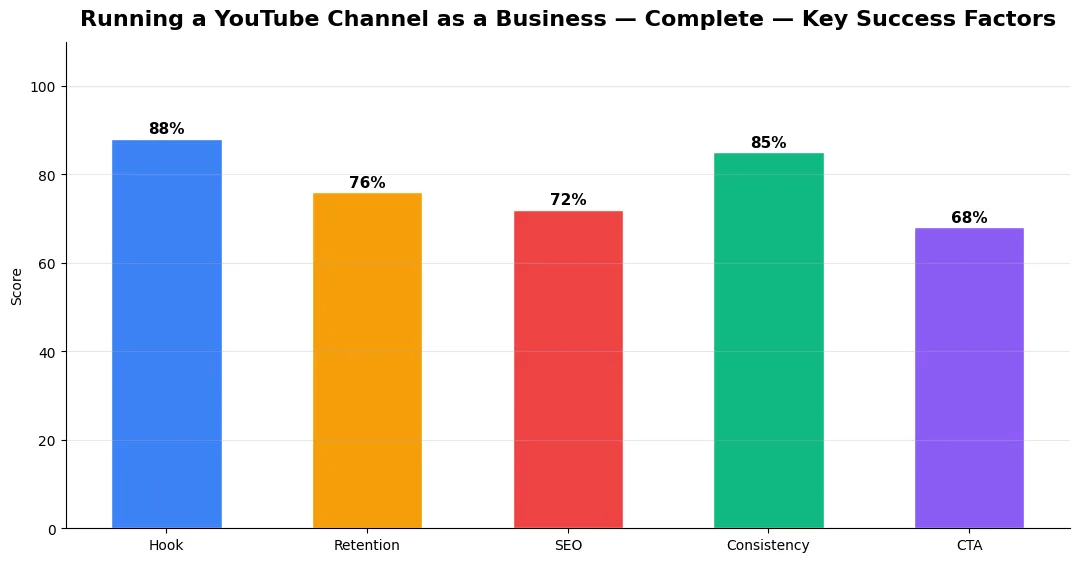
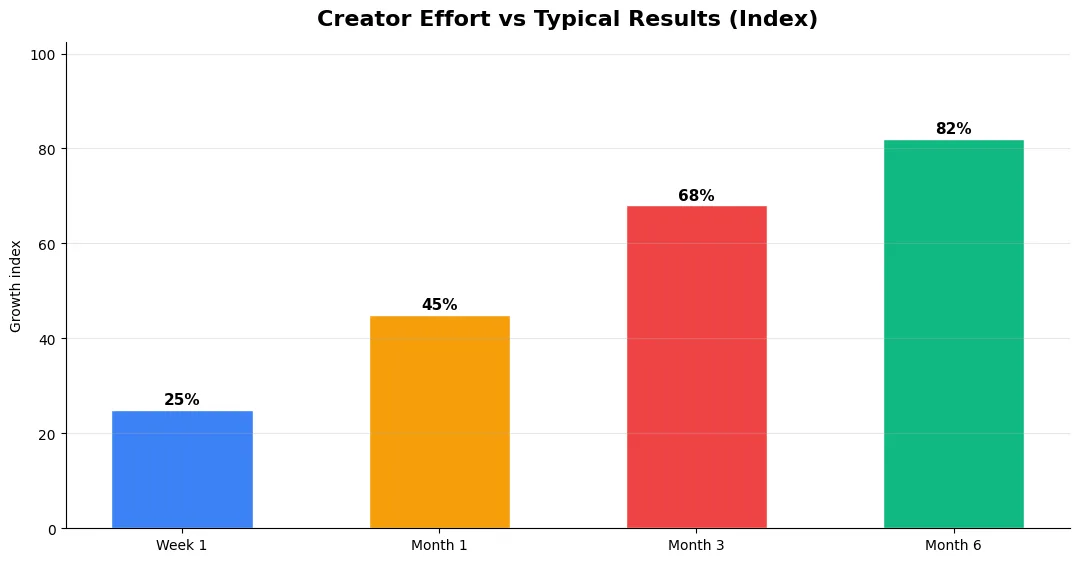
This guide covers running a youtube channel as in plain language for creators in India, the US, the UK, and global audiences. Whether you are starting out or refining a channel that already earns views, the frameworks below help you work smarter—not just post more often. Read through the charts and comparison table, then apply one change per week so improvements stick.
Registering Your YouTube Channel as a Business
Most Indian creators operate as sole proprietors by default, but registering as a business entity offers significant advantages. A sole proprietorship is the simplest option — just get a GST registration (mandatory if your annual revenue exceeds ₹20 lakh) and a PAN card. For creators earning ₹10 lakh+ annually, registering a One Person Company (OPC) or LLP provides liability protection and tax planning flexibility. Consult a CA before making this decision, but don’t wait until you’re earning big — setting up the structure early prevents painful transitions later.
Tax Guide for YouTube Creators in India
YouTube income in India is taxable under “Income from Business or Profession.” For the 2026-27 financial year, the key points: AdSense payments from Google Ireland are treated as export income (no GST applies to export of services). Sponsorship income from Indian brands attracts 18% GST if you’re registered. You can deduct legitimate business expenses — equipment, software subscriptions, internet, workspace, travel for shoots, and freelancer payments. Keep meticulous records and file ITR-3 or ITR-4 (for presumptive taxation under 44ADA if your income is under ₹75 lakh). A good CA who understands creator income will save you far more than their fees.
Building Your Content Production Team
The first hire most creators should make isn’t an editor — it’s a video manager who handles uploads, thumbnails, descriptions, scheduling, and analytics. This frees your creative bandwidth for what only you can do: ideation, scripting, and on-camera performance. A typical scaling path: start solo, then add a video editor (₹15,000-30,000/month for part-time), then a thumbnail designer (₹5,000-15,000/month), then a manager/VA. AI tools like YT Title Description Generator can handle metadata optimization, reducing the need for dedicated SEO help early on.
Creator Workspace Setup on a Budget
You don’t need a professional studio to produce great content. A dedicated corner of a room with basic acoustic treatment (foam panels, ₹2,000-5,000), a ring light or two softboxes (₹3,000-8,000), and a clean background works for 90% of creator content. Invest in audio first — a Boya BY-M1 lavalier mic (₹800) or Blue Snowball USB mic (₹4,000) dramatically improves perceived production quality. The total cost for a professional-looking setup is under ₹20,000 if you prioritize the essentials.
Content Batching and Production Workflow
The most sustainable approach to content creation is batch production — filming multiple videos in a single session and scheduling them across the week. Content sequencing means you need consistency, and batching is how you deliver it without burning out. A practical weekly workflow: Monday for research and scripting, Tuesday-Wednesday for filming 3-5 videos, Thursday-Friday for editing, and the weekend off. Use YouTube’s scheduler to publish at optimal times.
YouTube Creator Business vs Hobbyist Comparison
| Aspect | Hobbyist Creator | Business Creator |
|---|---|---|
| Legal Entity | None | Sole Prop / OPC / LLP |
| Tax Filing | ITR-1 / ITR-2 | ITR-3 / ITR-4 with expense deductions |
| Revenue Streams | AdSense only | Ads + sponsors + products + memberships |
| Team | Solo | Editor + designer + VA/manager |
| Content Planning | Random uploads | Batch production + editorial calendar |
| Brand Deals | Accept anything | Media kit + rate card + negotiation |
| Expenses Tracked | No | Yes (equipment, software, travel) |
| Monthly Income | ₹5,000-20,000 | ₹50,000-5,00,000+ |
Protecting Your Brand and Intellectual Property
As your channel grows, protect your brand. Trademark your channel name if it’s unique (₹4,500 filing fee). Copyright your original music, graphics, and format concepts. Understand YouTube’s Content ID system — both as a claimant and as someone who might receive claims. Have a basic contract template for brand deals that includes usage rights, exclusivity periods, payment terms, and FTC/ASCI disclosure requirements. For creators earning beyond ad revenue, contracts become essential to protect your income streams.
Final Verdict
Treating your YouTube channel as a business from day one — even if you’re just starting out — sets you up for sustainable, scalable success. Register properly, track expenses, plan your content in batches, hire strategically, and protect your brand. The creators who build businesses thrive for years; the ones who wing it eventually burn out or hit financial walls they can’t solve retroactively.
Common Mistakes to Avoid in 2026
The fastest way to stall growth is copying trends without adapting them to your niche voice. Another frequent error is optimizing only for views while ignoring audience fit, which inflates vanity metrics but hurts monetization and brand deals later. Avoid posting on inconsistent schedules; algorithms and audiences both reward predictable cadence.
Do not neglect analytics review. Spend thirty minutes weekly on retention curves, traffic sources, and click-through rate on thumbnails. Small iterative fixes—tighter hooks, clearer titles, better pacing—often outperform chasing entirely new formats every week.
Step-by-Step Workflow for 2026
Start by defining one clear outcome for every piece of content you publish. Map the viewer journey from the first frame to the subscribe or click action, and remove any step that does not move that journey forward. Batch your research, scripting, and B-roll capture so you are not context-switching between creative and administrative tasks every day.
Use a simple checklist before upload: title clarity, thumbnail readability on mobile, hook strength in the first three seconds, captions accuracy, and end-screen placement. Creators who treat upload as a quality gate—not a rush job—see compounding gains in retention and discovery over 2026.
Tools and Resources That Save Time
Invest in lightweight tools that reduce friction: a caption workflow, a thumbnail template system, and a title/description helper so metadata stays consistent. The YT Title Description Generator app helps you draft SEO-friendly titles and descriptions quickly when you batch-upload multiple videos.
Keep a swipe file of hooks, titles, and thumbnails that performed well in your niche—not to copy, but to analyze patterns. Pair that with YouTube Studio analytics and one external keyword or trend tool so creative decisions stay grounded in data.
Measuring Success — Metrics That Matter
Track average view duration and audience retention before raw view count. Rising retention tells you the content matches the promise of your title and thumbnail; falling retention signals a hook or pacing problem. Monitor click-through rate separately—high CTR with low retention usually means the packaging oversold the video.
For growth channels, watch subscriber conversion per thousand views and returning viewer percentage. For monetized channels, revenue per mille and watch time from high-value geographies matter more than viral spikes from low-monetization regions. Set monthly targets for two metrics only; too many KPIs dilute focus.
| Level | Strategy | Typical outcome |
|---|---|---|
| Beginner approach | Copy trends blindly | Low retention, no brand |
| Structured approach | Test hooks + analyze data | Steady growth |
| Pro approach | Series + community loop | Higher LTV audience |
Do YouTube creators need to register a business in India?
How are YouTube earnings taxed in India?
What should be the first hire for a YouTube creator?
How much does it cost to set up a YouTube creator workspace?
Final Verdict — Running A Youtube Channel As in 2026
Success with running a youtube channel as comes from clarity, consistency, and honest delivery on every title and thumbnail promise. Use the step-by-step workflow, avoid the common mistakes above, and measure retention before chasing viral spikes. Small weekly improvements compound into channel growth that lasts beyond a single trending moment.
Also Read:


