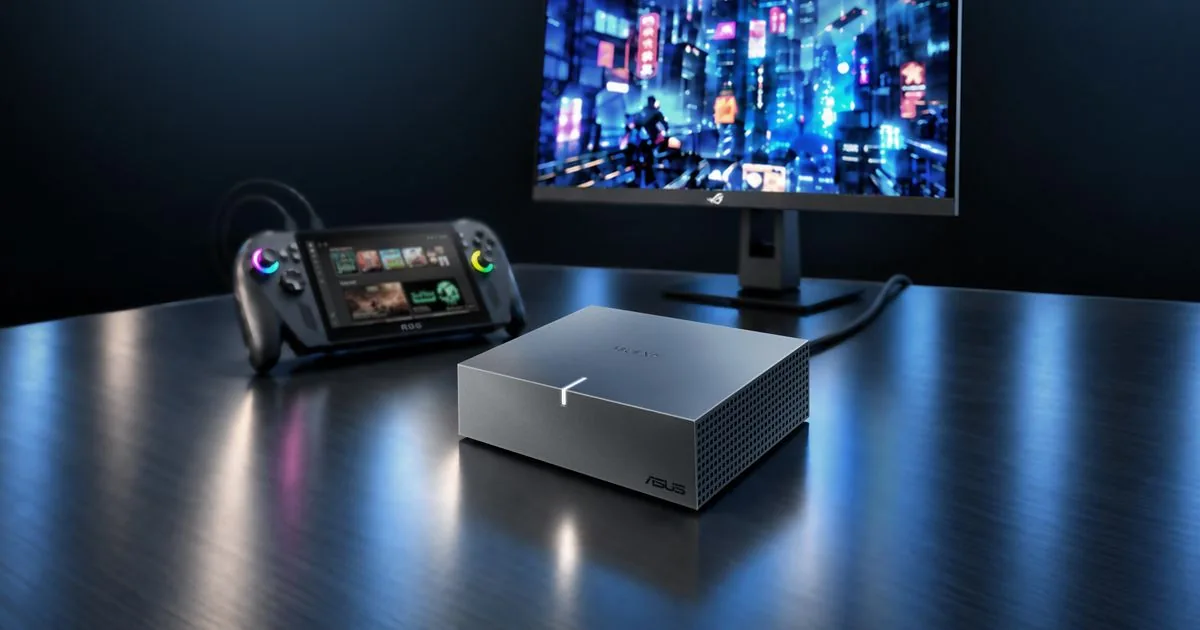
ASUS announced the XG Core on 6 November 2026. What are the specifications and features of the new ASUS XG Core external graphics card? The published model is XG-CORE-RX9060XT-LP-16G, a USB4 dock with an AMD Radeon RX 9060 XT LP and 16GB of GDDR6.
ASUS has not put a price or a ship date on the spec sheet. The sheet also says the product may not be sold in every market. Figures below come from that sheet and the 6 November press release. Tech Bichar has not tested a unit.
What are the specifications and features of the new ASUS XG Core external graphics card?
| Spec | ASUS listing |
|---|---|
| Model | XG-CORE-RX9060XT-LP-16G |
| GPU | AMD Radeon RX 9060 XT LP, RDNA 4 |
| Stream processors | 2048 |
| Game clock | Up to 1010 MHz. OC mode up to 1030 MHz |
| Boost clock | Up to 1600 MHz. OC mode up to 1620 MHz |
| Memory | 16GB GDDR6, 20 Gbps, 128-bit |
| AI figure | 406.3 TOPS, INT4, with matrix sparsity |
| Host link | USB-C, 40 Gbps. USB4, and compatible Thunderbolt 3 |
| Internal bus | PCI Express 4.0 |
| Video outputs | HDMI 2.1b x1, DisplayPort 2.1a x1 |
| Displays | Up to 2, listed maximum 3840 x 2160 |
| Power connector | A second USB-C port, marked for power |
| Size | 144 x 117 x 39 mm |
| Software | GPU Tweak III in the announcement. The spec row still says GPU Tweak II |
The 20 Gbps memory speed on a 128-bit bus works out to 320 GB/s. That is arithmetic from the two published numbers. ASUS does not print 320 GB/s on the spec page. OC mode clocks are the ones ASUS ties to GPU Tweak III. Default mode is the lower pair.
What it plugs into
The host connection is one USB-C port at up to 40 Gbps. The press release calls that USB4 and says compatible Thunderbolt 3 PCs work too. Named examples are laptops, mini PCs, the ROG Ally X, and the ROG Xbox Ally X. ASUS also says to check the host first. A USB-C port that can charge a laptop is not automatically a port that can run an external GPU.
Forty gigabits a second is about 5 GB/s of raw link speed. The spec sheet’s PCI Express 4.0 line is the bus inside the dock, not a full desktop x16 slot back to the computer. Expect less than a card sitting on a desktop motherboard. ASUS has not published a game-benchmark gap for that limit.
Video comes off the dock, not through the laptop lid. There is one HDMI 2.1b port and one DisplayPort 2.1a port, with HDCP 2.3. The sheet caps support at two displays and lists 3840 x 2160 as the maximum resolution. The box includes a USB-C cable, a USB-C adapter, a USB-C DC cable, a power cord, and a manual.
Power, size, and the software note
The dock is 144 x 117 x 39 mm. ASUS does not list a weight. It is not powered by the laptop alone. The spec sheet separates a 40 Gbps data port from a second USB-C port marked for power, and the box includes a power cord. The wattage of that supply is not on the sheet, so do not guess a laptop charger will do the job.
The announcement says tuning is done in GPU Tweak III, with controls for core clock, memory frequency, voltage, and fans, plus an on-screen display. The spec table’s software row still says GPU Tweak II, while the clock row says OC mode is set in GPU Tweak III. Treat III as the app ASUS is promoting, and confirm the download on the support page before you rely on either name.
Gaming, creation, and local AI
ASUS positions the dock for games, video editing, 3D work, and local AI on a machine you already own. The AI number on the spec sheet is narrow. It is 406.3 TOPS at INT4 with matrix sparsity, not a frame-rate claim and not a measure of every language model.
The press release names ComfyUI for image generation, and LM Studio and Ollama for local models. It also says performance depends on the model, the software, and the host. A handheld or thin laptop still has to drive the dock over that 40 Gbps link.
This is an AMD Radeon dock, not a GeForce card. If you were comparing desktop Nvidia prices instead, the current street prices are in our Nvidia graphics card price report. A laptop with the GPU already inside is a different purchase, covered in the AI laptop roundup. More hardware posts are in Technology.
What ASUS has not published
- No retail price, and no list of countries where it is on sale.
- No weight, and no power-supply wattage.
- No measured comparison against the same GPU on a desktop motherboard.
- No promise that every USB4 or Thunderbolt 3 port will work. The host has to support external graphics.
Bottom line
The new ASUS XG Core is a 144 x 117 x 39 mm USB4 dock with a Radeon RX 9060 XT LP, 16GB of GDDR6, HDMI 2.1b, and DisplayPort 2.1a. It is a way to add a desktop-class GPU to a compatible laptop, mini PC, or ROG handheld without opening the case. Wait for a price, and check that your USB-C port can actually run an external GPU, before you treat the announcement as a store listing.
Sources
- ASUS tech specs, XG-CORE-RX9060XT-LP-16G.
- ASUS press release, 6 November 2026.
- ASUS XG Core product page.
What are the specifications and features of the new ASUS XG Core external graphics card?
It is model XG-CORE-RX9060XT-LP-16G, announced 6 November 2026. ASUS lists a Radeon RX 9060 XT LP, 16GB of GDDR6, a 40 Gbps USB-C host link, HDMI 2.1b, DisplayPort 2.1a, and a 144 x 117 x 39 mm body.
Does the XG Core work with any USB-C laptop?
No. ASUS specifies USB4 at up to 40 Gbps, plus compatible Thunderbolt 3 systems, and says to confirm the host supports external graphics.
How many monitors can it drive?
The spec sheet lists two displays, with a stated maximum resolution of 3840 x 2160, over one HDMI 2.1b port and one DisplayPort 2.1a port.
How much does the ASUS XG Core cost?
ASUS had not published a retail price on the spec sheet or the 6 November announcement. It also says the product may not be available in every market.
Is the 406.3 TOPS figure a gaming score?
No. ASUS lists 406.3 AI TOPS for INT4 with matrix sparsity. It is not a frame-rate measurement.