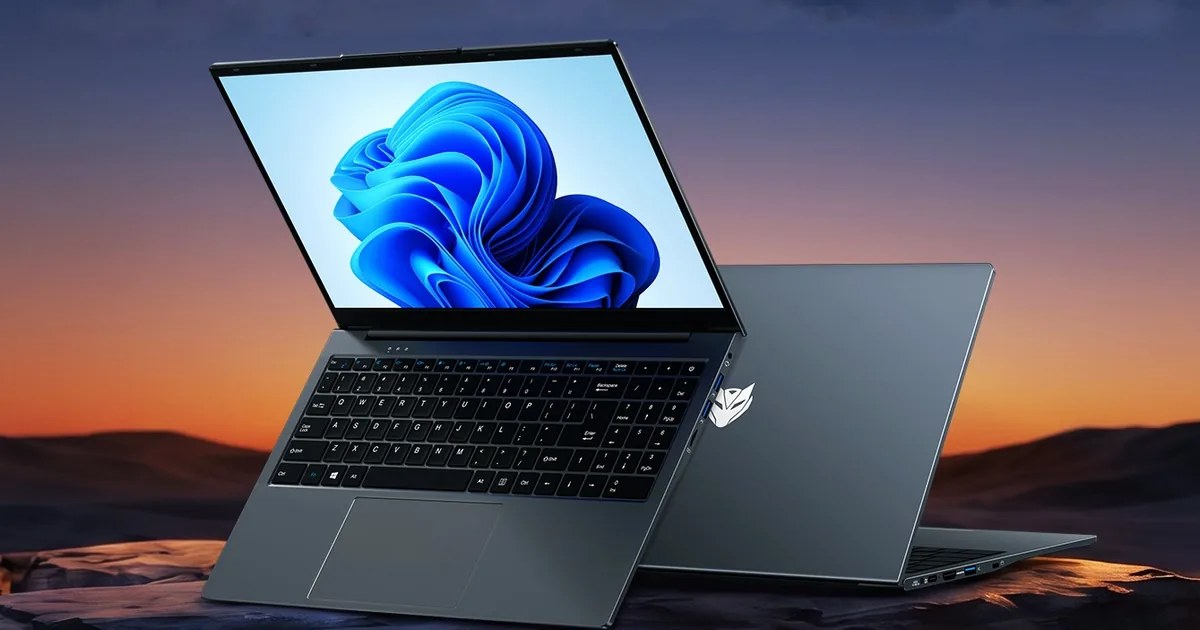
What are the specs and features of the new Bmax MaxBook X15 S Pro budget laptop? BMAX lists a 15.6-inch 1920×1080 IPS screen, 12GB of memory, Intel Core i3-8109U graphics and processor, and Windows 11 Pro. The same product page then disagrees with itself on storage. The opening line says 512GB. The spec table says 256GB.
There is no street price on that page, and the company’s news post still calls the laptop “coming soon.” Treat “budget” as the positioning, not as a verified rupee or dollar price. Figures below come from BMAX’s product page and launch note, plus Notebookcheck’s report on the chip. Tech Bichar has not tested a unit.
What are the specs and features of the new Bmax MaxBook X15 S Pro budget laptop?
This is the spec table from BMAX’s MaxBook X15 S Pro product page. Where the launch note adds a detail the table does not, that detail is marked as a claim from the news post.
| Spec | What BMAX lists |
|---|---|
| Model | MaxBook X15 S Pro |
| Processor | Intel Core i3-8109U, 2 cores and 4 threads |
| Clock | 3.0 GHz base, 3.6 GHz turbo |
| Graphics | Intel Iris Plus Graphics 655 |
| Memory | 12GB. Type and whether it can be upgraded are not listed |
| Storage | 512GB SSD in the page intro and the launch note. 256GB SSD in the spec table |
| Extra storage | One M.2 2280 SATA slot listed. BMAX does not say the slot is free |
| Display | 15.6-inch IPS LCD, 1920 x 1080 |
| Operating system | Windows 11 Pro |
| Wireless | Wi-Fi 802.11ac/a/b/g/n, Bluetooth 5.0 |
| Ports | USB-C x1, USB 3.0 x3, HDMI x1, 3.5 mm headset, microSD, Kensington lock |
| Audio | Two-channel sound, listed as 4 speakers |
| Cooling | Smart fan and dual copper heat pipes |
| Battery | 51.3 Wh, 11.4 V. About 7 hours of local 1080p video is a BMAX claim |
| Size | 357.4 x 227.9 x 19 mm. BMAX says the finished unit can vary |
| Weight | About 1.6 kg. BMAX says the finished unit can vary |
Display, keyboard, and the flat hinge
The panel is a 15.6-inch IPS LCD at 1920 x 1080. That is a normal full-HD office screen. BMAX does not publish refresh rate, brightness, or color coverage, so those cannot be scored from the spec sheet. Notebookcheck’s write-up makes the same point: the panel should be usable, and the color performance is unknown.
The product page calls the body a “180° convertible” slim case. The launch note is clearer. The hinge opens until the screen lies flat, which helps when you share a document across a table. It does not say the laptop folds into a tablet, and there is no touchscreen in the spec list.
The launch note adds a space-gray metal chassis, a full-size keyboard with 20 mm key pitch, and a large touchpad with two-finger scroll, pinch-to-zoom, a three-finger task switcher, and a four-finger action center. Those typing and gesture details are from the news post, not the spec table. A webcam is not listed on either page. Do not assume the laptop has one.
Ports, wireless, and battery
For a budget 15.6-inch laptop, the port list is the practical strength. You get three USB 3.0 Type-A ports, one USB-C port, HDMI, a microSD reader, a headset jack, and a Kensington lock slot. BMAX labels the USB-C port “full features” without saying whether that includes charging, display output, or both. Until a manual spells that out, plan on the HDMI port for an external monitor and do not count on USB-C power.
Wireless is Wi-Fi 5 class, written as 802.11ac/a/b/g/n, plus Bluetooth 5.0. The launch note says the radio is dual-band, 2.4 GHz and 5 GHz. There is no Wi-Fi 6 or 6E claim.
The battery is 51.3 Wh at 11.4 V, which BMAX also writes as three 4500 mAh cells at 3.8 V. The company says that pack lasts about 7 hours of local 1080p video, and longer in light office work. That is a manufacturer playback claim, not a mixed-use test. No charger wattage is published.
The processor is the real limit
The Core i3-8109U is an 8th-generation Intel chip: 2 cores, 4 threads, 3.0 GHz base, and 3.6 GHz turbo, with Iris Plus Graphics 655. The launch note adds a 14 nm process, 4 MB of cache, a 28 W TDP, and a PassMark score of 6070. BMAX says that score is about 11 percent above the Intel N150 result it quotes at 5466.
Notebookcheck describes the same chip as nearly eight years old and estimates roughly 2,000 points in Cinebench R23 multi-core, about 500 points behind an N150. Those two write-ups are not the same test. PassMark and Cinebench can rank two chips in different orders. What both sources agree on is the shape of the processor: a dual-core part from an old generation, aimed at light work.
Iris Plus 655 can drive the 1080p screen and, on BMAX’s account, play 4K video at 60 fps. That does not make this a game laptop or a local AI laptop. If you want a machine sold for heavier creative work, the AI laptop roundup is a different class of hardware.
Storage, cooling, and Windows 11 Pro
Confirm the SSD before you pay. On one BMAX product page, the summary says 512GB and the specification table says 256GB. The launch note repeats 512GB. A retailer mirror of the spec table also shows 256GB. Until BMAX publishes one SKU list, either size may be the one in the box.
The table lists a single M.2 2280 SATA slot. It does not say you can add a second drive beside the included SSD. SATA, not NVMe, is what the table prints.
Cooling is a smart fan with two copper heat pipes. BMAX says the fan slows down during ordinary office work. Windows 11 Pro is the listed operating system, and the launch note mentions a BMAX recovery tool for restoring the system after a failure. No other bundled software is specified.
Who it suits, and what is still missing
- A fit for a browser, documents, video calls, and 1080p playback, if the price lands where the “budget” label implies.
- A weak fit for current games, 3D work, local AI models, or long video exports. Two cores is the ceiling.
- A poor fit if you need a known webcam, a stated RAM type, or Wi-Fi 6. None of those are on the spec sheet.
Indian buyers comparing student machines should not drop this model onto a price list yet. BMAX has not published a retail price or an India ship date on the pages checked for this article. Our student laptop guide under Rs 50,000 only includes machines with known local pricing. Once Windows 11 is on the machine, screen mirroring an iPhone to a Windows 11 laptop is a separate setup, not a feature of this chassis.
Bottom line
What are the specs and features of the new Bmax MaxBook X15 S Pro budget laptop? A 15.6-inch 1080p IPS screen, 12GB of RAM, a flat 180-degree hinge, a useful set of ports, and Windows 11 Pro, wrapped around a dual-core 8th-generation Intel chip. Check whether the SSD is 256GB or 512GB, and wait for a real price before calling it a bargain.
Sources
- MaxBook X15 S Pro product page, BMAX. Summary and spec table disagree on SSD size.
- MaxBook X15 S Pro launch note, BMAX. Battery, keyboard, PassMark, and chassis claims.
- Notebookcheck report on the Core i3-8109U configuration.
What are the specs and features of the new Bmax MaxBook X15 S Pro budget laptop?
BMAX lists a 15.6-inch 1920×1080 IPS display, 12GB of RAM, an Intel Core i3-8109U with Iris Plus 655 graphics, Windows 11 Pro, and a 51.3 Wh battery. Storage is listed as both 256GB and 512GB.
Is the SSD 256GB or 512GB?
Both numbers appear in BMAX’s own material. The product-page table says 256GB. The page summary and the launch note say 512GB. Confirm the SKU with the seller.
Does the MaxBook X15 S Pro fold into a tablet?
No. BMAX describes a hinge that opens to 180 degrees so the screen can lie flat. The spec sheet does not list a touchscreen.
How much does it cost?
BMAX had not published a retail price on the product page checked for this article. The launch note still described the laptop as coming soon.
Can it handle games or local AI?
The published processor is a 2-core, 4-thread 8th-generation Core i3. That fits light office work and video playback, not current games or local AI models.