Your video might be great, but if the title and description don’t convince people to click, nobody will ever see it. YouTube SEO starts with metadata — titles, descriptions, and tags are what tell the algorithm who should see your content. The good news: several free AI tools can generate optimized metadata in seconds. Here are the best ones every creator should be using in 2026.
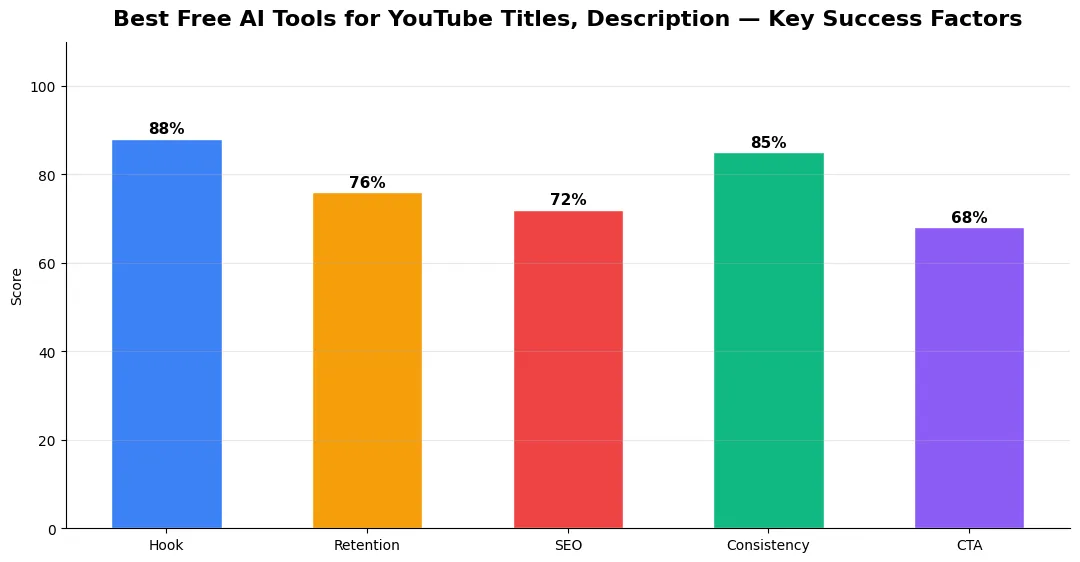
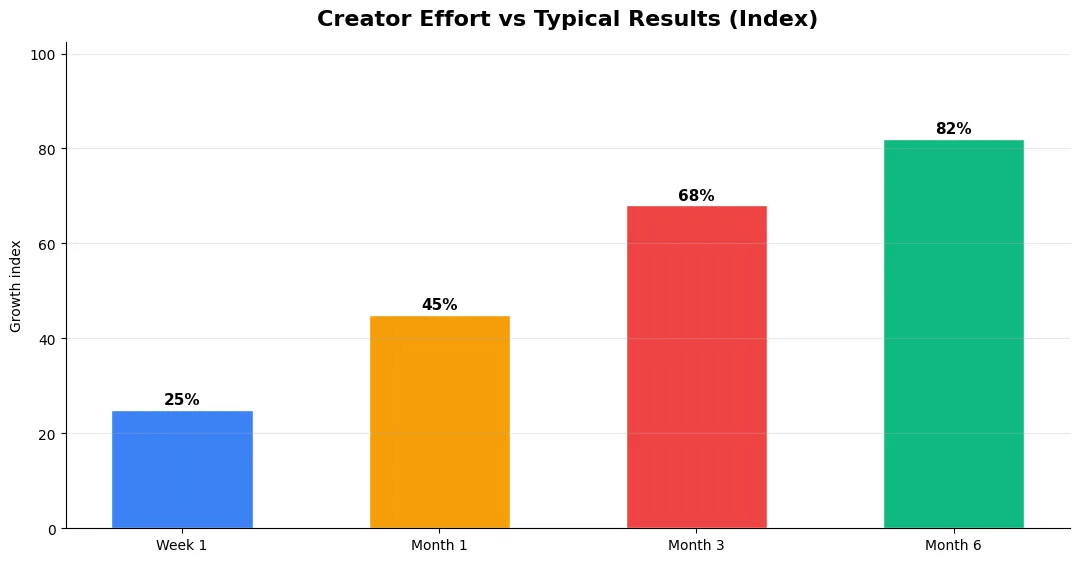
This guide covers best free ai tools for in plain language for creators in India, the US, the UK, and global audiences. Whether you are starting out or refining a channel that already earns views, the frameworks below help you work smarter—not just post more often. Read through the charts and comparison table, then apply one change per week so improvements stick.
Why YouTube Titles and Descriptions Matter More Than Ever
YouTube’s 2026 algorithm weighs click-through rate (CTR) as one of its top-3 ranking signals alongside watch time and engagement. Your title directly controls your CTR. A mediocre title on a brilliant video will get buried. A perfectly optimized title on a good video will outperform it every time.
Descriptions matter just as much for search. YouTube scans your description text to understand what your video is about and match it to search queries. A well-written description with natural keyword placement can rank your video for dozens of related searches beyond just the exact title match. Most creators either leave descriptions blank or copy-paste the same template — both are missed opportunities. AI tools for YouTube titles and descriptions solve this problem instantly.
Best Free AI Tools for YouTube Titles and Descriptions
1. YT Title Description Generator (Android App)
The YT Title Description Generator is a standout free tool built specifically for YouTube creators. You enter your video topic, and the AI generates an SEO-optimized title (80-95 characters), a comprehensive description (200-250 words), strategic hashtags, and call-to-action phrases. It also includes a tag generator, text-to-speech preview, revenue calculator, and — in its latest update — an AI thumbnail generator. No login required, no subscription needed. It’s the fastest way to go from “topic idea” to “publish-ready metadata.”
2. TubeBuddy (Browser Extension)
TubeBuddy’s free tier offers keyword research, tag suggestions, and A/B title testing. The SEO Studio feature analyzes your title and description against competitors and suggests improvements. The paid version ($4.99/month) adds advanced analytics and bulk processing for channels managing many videos.
3. vidIQ (Browser Extension)
vidIQ provides keyword scores, trending tag suggestions, and competitor analysis. Its AI Coach feature can generate title and description suggestions based on your video content. The free plan covers basic needs; the pro plan ($7.50/month) unlocks AI title generation and trend alerts that help you find trending topics early.
4. ChatGPT / Claude (General AI)
General AI chatbots can generate titles and descriptions when given the right prompts. The downside: they don’t have YouTube-specific optimization logic built in. You need to specify character limits, keyword placement, and CTR-optimization in your prompt. They work well as a fallback but require more manual guidance than purpose-built YouTube tools.
AI Tools for YouTube Titles and Descriptions Compared
| Tool | Price | Title Gen | Description Gen | Tags | Thumbnail AI | Platform |
|---|---|---|---|---|---|---|
| YT Title Desc Generator | Free | Yes | Yes (200-250 words) | Yes | Yes (new) | Android App |
| TubeBuddy | Free–$4.99/mo | A/B Testing | Suggestions | Yes | No | Browser |
| vidIQ | Free–$7.50/mo | Yes (Pro) | Yes (Pro) | Yes | No | Browser |
| ChatGPT | Free–$20/mo | Manual prompting | Manual prompting | Manual | No | Web/App |
For creators who want instant, no-fuss metadata generation on mobile, the YT Title Description Generator app is the clear winner — it’s free, purpose-built, and requires zero configuration. TubeBuddy and vidIQ are better for in-depth keyword research and competitor analysis at your desktop. The ideal stack: use TubeBuddy or vidIQ for research, then YT Title Desc Generator for rapid title and description creation.
5 Tips for Writing High-CTR YouTube Titles
Even with AI tools, understanding what makes a great title helps you pick the best option:
1. Front-load the keyword. Put your main search term in the first 40 characters. YouTube truncates titles on mobile — make sure the important part is visible. 2. Use numbers. “7 Tips” outperforms “Tips” every time. Specific numbers set clear expectations. 3. Create a curiosity gap. “I Tested the $50 vs $500 Camera — The Result Shocked Me” works because viewers need to know the result. 4. Avoid all-caps and excessive punctuation. YouTube’s algorithm can deprioritize titles that look spammy. 5. Match search intent. If people search “how to edit videos,” your title should start with “How to Edit Videos” — not a clever rewrite that obscures the topic.
Final Verdict
Optimized titles and descriptions are the single highest-ROI activity for YouTube growth. AI tools eliminate the guesswork and save hours of manual optimization. Start with the free YT Title Description Generator for instant metadata, layer in TubeBuddy or vidIQ for keyword research, and watch your CTR climb. Your content deserves to be found — your metadata is how you make that happen.
Step-by-Step Workflow for 2026
Start by defining one clear outcome for every piece of content you publish. Map the viewer journey from the first frame to the subscribe or click action, and remove any step that does not move that journey forward. Batch your research, scripting, and B-roll capture so you are not context-switching between creative and administrative tasks every day.
Use a simple checklist before upload: title clarity, thumbnail readability on mobile, hook strength in the first three seconds, captions accuracy, and end-screen placement. Creators who treat upload as a quality gate—not a rush job—see compounding gains in retention and discovery over 2026.
Advanced Tips for Competitive Niches
In saturated niches, specificity wins. Narrow your positioning until you can describe your ideal viewer in one sentence, then speak directly to that person in every title and hook. Collaborate with adjacent creators whose audiences overlap but are not identical—this expands reach without diluting brand identity.
Repurpose top performers into Shorts, community posts, and newsletter snippets to extract more value from proven ideas. Update evergreen videos when platforms change features; refreshed metadata and a pinned comment with the latest link can revive older assets.
Common Mistakes to Avoid in 2026
The fastest way to stall growth is copying trends without adapting them to your niche voice. Another frequent error is optimizing only for views while ignoring audience fit, which inflates vanity metrics but hurts monetization and brand deals later. Avoid posting on inconsistent schedules; algorithms and audiences both reward predictable cadence.
Do not neglect analytics review. Spend thirty minutes weekly on retention curves, traffic sources, and click-through rate on thumbnails. Small iterative fixes—tighter hooks, clearer titles, better pacing—often outperform chasing entirely new formats every week.
Tools and Resources That Save Time
Invest in lightweight tools that reduce friction: a caption workflow, a thumbnail template system, and a title/description helper so metadata stays consistent. The YT Title Description Generator app helps you draft SEO-friendly titles and descriptions quickly when you batch-upload multiple videos.
Keep a swipe file of hooks, titles, and thumbnails that performed well in your niche—not to copy, but to analyze patterns. Pair that with YouTube Studio analytics and one external keyword or trend tool so creative decisions stay grounded in data.
| Level | Strategy | Typical outcome |
|---|---|---|
| Beginner approach | Copy trends blindly | Low retention, no brand |
| Structured approach | Test hooks + analyze data | Steady growth |
| Pro approach | Series + community loop | Higher LTV audience |
What is the best free AI tool for YouTube titles and descriptions?
How long should a YouTube title be for SEO?
Do YouTube descriptions affect video ranking?
Should YouTube creators use AI tools for video metadata?
Final Verdict — Best Free Ai Tools For in 2026
Success with best free ai tools for comes from clarity, consistency, and honest delivery on every title and thumbnail promise. Use the step-by-step workflow, avoid the common mistakes above, and measure retention before chasing viral spikes. Small weekly improvements compound into channel growth that lasts beyond a single trending moment.
Also Read:


