YouTube just dropped a feature that sounds like science fiction: an AI Shorts generator that creates videos using your own face and voice. The tool lets creators produce Shorts by simply typing a prompt, and the AI generates a video featuring their digital likeness — complete with lip-synced audio and natural expressions. It’s rolling out to creators in the YouTube Partner Program starting this month.
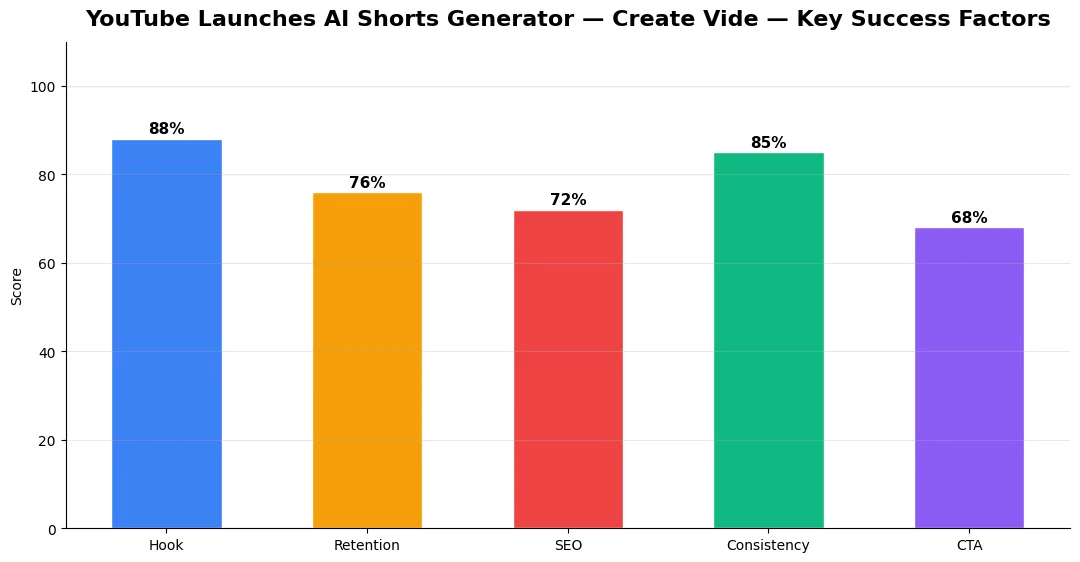
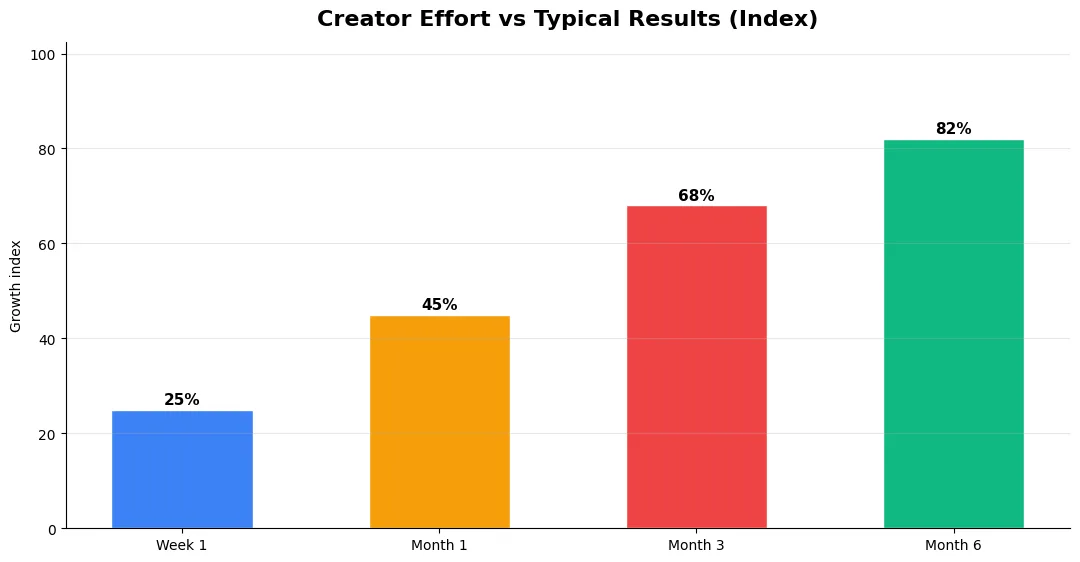
This guide covers youtube launches ai shorts generator in plain language for creators in India, the US, the UK, and global audiences. Whether you are starting out or refining a channel that already earns views, the frameworks below help you work smarter—not just post more often. Read through the charts and comparison table, then apply one change per week so improvements stick.
How YouTube’s AI Shorts Generator Works
The feature is built into YouTube Studio under a new “AI Create” tab. You first need to train a digital model of yourself by uploading 3-5 minutes of footage showing your face from different angles while speaking. YouTube’s AI processes this into a “creator likeness model” stored securely in your account.
Once your likeness model is ready, you type a prompt describing the Short you want. For example: “Explain 3 iPhone tips in an excited tone with quick cuts.” The AI generates a 30-60 second video of your digital self delivering the content. You can edit the script, change the background, adjust pacing, and tweak the tone before publishing. The output quality is surprisingly natural — viewers in early tests struggled to distinguish AI-generated Shorts from real ones.
Who Gets Access to YouTube AI Shorts Generator?
YouTube is rolling this out in phases. Currently, only YouTube Partner Program members with 10,000+ subscribers can access the tool. YouTube plans to expand availability to all YPP members by Q3 2026. The feature is free to use with no per-video charges, but there’s a daily limit of 10 AI-generated Shorts per channel during the beta period.
Every AI-generated Short automatically gets a label in the description disclosing it was created with AI. This is mandatory and cannot be removed. YouTube says this is about transparency — viewers have the right to know when content involves synthetic media. The label doesn’t affect algorithm distribution, though.
The Opportunities and Risks for Creators
The biggest opportunity is volume. Creators who previously posted 2-3 Shorts per week can now produce 10+ without spending hours in front of a camera. For educational and tech creators especially, this is a massive productivity boost. You can cover trending topics faster, test more thumbnails and hooks, and maintain consistent posting even when traveling or sick.
The risks are real too. Audience trust could suffer if viewers feel deceived, even with the AI label. There’s also the “AI slop” concern — channels that flood the platform with low-effort AI Shorts may face reduced visibility as YouTube prioritizes authentic engagement. The smartest creators are using AI Shorts as supplements, not replacements, for their genuine on-camera content.
YouTube AI Shorts vs Other AI Video Tools
| Feature | YouTube AI Shorts | HeyGen | Synthesia |
|---|---|---|---|
| Price | Free (YPP members) | $29/month | $22/month |
| Likeness Training | 3-5 min footage | 2 min footage | Studio recording needed |
| Output Platform | YouTube Shorts only | Any platform | Any platform |
| AI Label Required | Yes (mandatory) | No | No |
| Max Video Length | 60 seconds | Unlimited | Unlimited |
| Daily Limit | 10 videos/day | Based on plan | Based on plan |
| Quality | Excellent (native YT integration) | Very good | Good |
YouTube’s biggest advantage is being free and natively integrated. You don’t need third-party subscriptions, and the Shorts go straight to YouTube without export/upload steps. HeyGen and Synthesia remain better choices if you need videos for other platforms or longer content. But for pure YouTube Shorts production, the native tool is hard to beat on convenience.
Final Verdict
YouTube’s AI Shorts generator is a genuine game-changer for creators who want to scale their Short-form output without burnout. Use it to supplement your real content, not replace it. The best approach: create your main videos on camera, then use AI to generate supporting Shorts that drive traffic to those longer videos. Pair it with optimized titles using tools like the YT Title Description Generator to maximize each Short’s reach.
Advanced Tips for Competitive Niches
In saturated niches, specificity wins. Narrow your positioning until you can describe your ideal viewer in one sentence, then speak directly to that person in every title and hook. Collaborate with adjacent creators whose audiences overlap but are not identical—this expands reach without diluting brand identity.
Repurpose top performers into Shorts, community posts, and newsletter snippets to extract more value from proven ideas. Update evergreen videos when platforms change features; refreshed metadata and a pinned comment with the latest link can revive older assets.
Common Mistakes to Avoid in 2026
The fastest way to stall growth is copying trends without adapting them to your niche voice. Another frequent error is optimizing only for views while ignoring audience fit, which inflates vanity metrics but hurts monetization and brand deals later. Avoid posting on inconsistent schedules; algorithms and audiences both reward predictable cadence.
Do not neglect analytics review. Spend thirty minutes weekly on retention curves, traffic sources, and click-through rate on thumbnails. Small iterative fixes—tighter hooks, clearer titles, better pacing—often outperform chasing entirely new formats every week.
Tools and Resources That Save Time
Invest in lightweight tools that reduce friction: a caption workflow, a thumbnail template system, and a title/description helper so metadata stays consistent. The YT Title Description Generator app helps you draft SEO-friendly titles and descriptions quickly when you batch-upload multiple videos.
Keep a swipe file of hooks, titles, and thumbnails that performed well in your niche—not to copy, but to analyze patterns. Pair that with YouTube Studio analytics and one external keyword or trend tool so creative decisions stay grounded in data.
Step-by-Step Workflow for 2026
Start by defining one clear outcome for every piece of content you publish. Map the viewer journey from the first frame to the subscribe or click action, and remove any step that does not move that journey forward. Batch your research, scripting, and B-roll capture so you are not context-switching between creative and administrative tasks every day.
Use a simple checklist before upload: title clarity, thumbnail readability on mobile, hook strength in the first three seconds, captions accuracy, and end-screen placement. Creators who treat upload as a quality gate—not a rush job—see compounding gains in retention and discovery over 2026.
| Level | Strategy | Typical outcome |
|---|---|---|
| Beginner approach | Copy trends blindly | Low retention, no brand |
| Structured approach | Test hooks + analyze data | Steady growth |
| Pro approach | Series + community loop | Higher LTV audience |
Is YouTube’s AI Shorts generator free to use?
Can viewers tell if a YouTube Short was made with AI?
How many AI Shorts can you create per day on YouTube?
Does the AI label affect video performance on YouTube?
Final Verdict — Youtube Launches Ai Shorts Generator in 2026
Success with youtube launches ai shorts generator comes from clarity, consistency, and honest delivery on every title and thumbnail promise. Use the step-by-step workflow, avoid the common mistakes above, and measure retention before chasing viral spikes. Small weekly improvements compound into channel growth that lasts beyond a single trending moment.
Also Read:


